



YouTube, launched in 2005 and acquired by Google in 2006, is the world’s most widely used video-sharing platform. The platform allows users to watch, upload, rate and share videos, create playlists and post comments on videos from every genre.
YouTube is one of the largest and most active social media platforms, with more than 2.5 billion monthly active users. The volume of content hosted on YouTube is incredible: users collectively watch over 1 billion hours of video daily, while 500 hours of content are uploaded every minute. The majority of users are between 18 and 34, constituting over 60% of all YouTube views.
Though YouTube is free to use, the platform offers a subscription service called YouTube Premium, that allows users to watch videos without advertisements.
YouTube is far more than an entertainment platform; it is also a dynamic open-source information (OSINT) resource that investigators can use to verify events, track incidents, and map digital activity across regions and communities. Its value comes from both the content itself and the digital ecosystem surrounding each video.
In this guide, we will show you how to conduct OSINT investigations on Youtube, why it is an essential platform for intelligence, and how to overcome the main challenges of investigating on the platform.
Why is YouTube Important for OSINT Investigators?
YouTube is an essential tool and information source for OSINT investigators, for many reasons, including:
1. Real-time Visual Analysis
YouTube hosts a lot of video content posted live or shortly after significant events.
OSINT analysts can inspect these videos frame by frame to extract details that may be missed when viewing the live video, such as weather conditions, architectural features, people, vehicles, and landmarks. This visual evidence is crucial for understanding precisely what happened during potentially chaotic events such as protests and natural disasters, or in war zones.
2. Video Metadata
YouTube videos also contain embedded metadata. Although YouTube strips most metadata from uploaded videos, certain metadata types persist.
Surviving metadata can include the video upload date and time, uploader account information, video descriptions (which may contain location details or context), and, in some cases, geolocation data if the uploader has not disabled it. OSINT analysts can also examine video titles, tags, and categories to understand how content is being framed and distributed.
3. Public Records of Events
YouTube serves as a de facto archive of modern history. It preserves a large number of videos documenting protests, natural disasters, public events, political speeches, and cultural moments from across the globe.
This preservation is incredibly helpful for journalists, researchers, human rights investigators, and legal practitioners, who may require evidence of events that occurred months or years earlier.
4. Geolocation and Verification of Events
YouTube videos may contain visual clues that allow skilled OSINT gatherers to determine the location of certain footage, even when the location is not explicitly mentioned.
OSINT gatherers can use specific techniques to uncover YouTube video locations, such as cross-referencing landmarks, street signs, architecture, mountain ranges, or distinctive vegetation with satellite imagery from Google Earth or other mapping services.
5. Global Reach
YouTube has a large global user base. It boasts 2 billion monthly active users, is available in more than 100 countries, and supports up to 80 languages. YouTube positions itself as the first video source of global events. This global coverage enables OSINT analysts to access footage from regions where traditional media may have limited access or where local journalists face restrictions.
6. User Comments
The comment section on any given Youtube video may provide important information that complements the content of the video itself. By inspecting the comment section of a particular video, OSINT gatherers can often:
- Understand more about the video's context
- Build a timeline of events based on users' comments
- Understand the video's cultural context
- Identify specific locations or individuals
- Gather firsthand experiences related to the events depicted in the video
Commenters may also link to other videos or content that provide additional perspectives for investigations.
7. Extreme Content & Disinformation
The fact that extremist groups, conspiracy theorists, and state-sponsored disinformation campaigns have access to YouTube allows OSINT researchers to study these phenomena, track their spread, identify key influencers, and develop counter-strategies.
The Challenges of YouTube OSINT Investigations
Though there is a wealth of data to sift through, there are many challenges that come with investigating on Youtube, including:
1. Privacy Considerations
YouTube videos frequently feature identifiable individuals who have not consented to be in videos. OSINT analysts should use special care when dealing with videos of children, victims of violence, or people in vulnerable positions, especially when including YouTube videos in final reports.
Faces, license plates, home addresses, and other personally identifiable information may be visible in videos; if exploited by malicious actors, such information can cause harm to their owners, including doxxing or harassment.
2. Deleted Content
YouTube frequently removes videos for various reasons, such as copyright infringement or violations of YouTube community standards (e.g., hate speech, harassment, graphic violence).
And sometimes users themselves remove videos they upload.
Regardless of the reason for removal, this can be problematic for OSINT invesitgators—especially if the subject video contained important information for an investigation.
OSINT gatherers should use online evidence collection services to store YouTube evidence and, if necessary, download it to computers for offline storage.
3. Age-Restrictions
YouTube places age restrictions on videos containing violence, profanity, and mature themes. This content may be useful for OSINT investigative work, and browsing it requires the OSINT gatherer to log in to YouTube using their Google account to verify their age. Logging into the platform will undoubtedly leave a digital footprint that reduces investigators' anonymity, especially when conducting sensitive investigations such as war crimes or high-profile controversies.
Age restrictions may also make automated data collection more challenging, as scraping tools and APIs may be unable to access such content.
4. Metadata Loss
When uploading a video to YouTube, the platform typically strips away important technical metadata associated with the video file such as the:
- Capturing device (e.g., manufacturer, model, and serial number) used to record the video.
- Date and time when the video was recorded; YouTube usually replaces it with the upload date and time.
- GPS coordinates embedded in the source video file.
To further complicate the work of OSINT analysts, some uploaders spread disinformation in the comment section, making it more challenging to trace the video's true source and content.
5. Misleading Content
YouTube is full of videos that are intentionally deceptive or accidentally misrepresent events.
Old footage often gets recycled and falsely attributed to recent events. For instance, video from a 2018 conflict might be presented as showing violence that happened in 2025.
The proliferation of AI technologies has also made deepfakes and manipulated videos increasingly sophisticated and accessible to the public, further complicating OSINT investigators' work in distinguishing between accurate and fake content.
6. Regional Restrictions
YouTube employs geographic blocking for various legal, copyright, and political reasons, meaning content shown in one country may not be accessible in another. This issue creates search gaps for investigators examining the platform, as they can receive fewer results based on their location.
Additionally, government requests for censorship can result in entire channels being removed from users in certain countries, particularly where the relevant events are occurring (and the information is most needed). Copyright claims can also block videos in some jurisdictions, thereby fragmenting the available evidence base.
YouTube OSINT Collection Techniques
YouTube content can be searched via the platform's built-in search functionality, specialized YouTube search operators, and Google Dorks. Next we will explore these search techniques and provide examples for each. Before we begin, let us discuss how YouTube indexes and displays search results for users.
How YouTube Search Works
YouTube has an extensive repository of content, with over 500 hours of videos uploaded every minute. To enable users to search within this massive video database, YouTube employs a specific ranking mechanism to help them find what they need.
To predict a video's relevance, YouTube considers multiple factors, including the extent to which the title, tags, description, and video content match a viewer's search query. Engagement also provides clues about a video's relevance. For instance, YouTube monitors the watch time of videos for a particular search query to determine whether other users consider the video to be relevant.
For quality, YouTube uses various signals to identify which channels demonstrate expertise, authoritativeness, and trustworthiness on specific topics. It is worth noting that YouTube does not accept payment for better placement within organic search results.
Using YouTube’s Built-in Search Function
The platform’s built-in search function allows users to search YouTube videos, channels, and playlists using keywords or phrases. Users can also use advanced filters and specific search operators to find more relevant results.
To access the YouTube search function, open YouTube.com and locate the search box in the upper middle of the page (see Figure 1).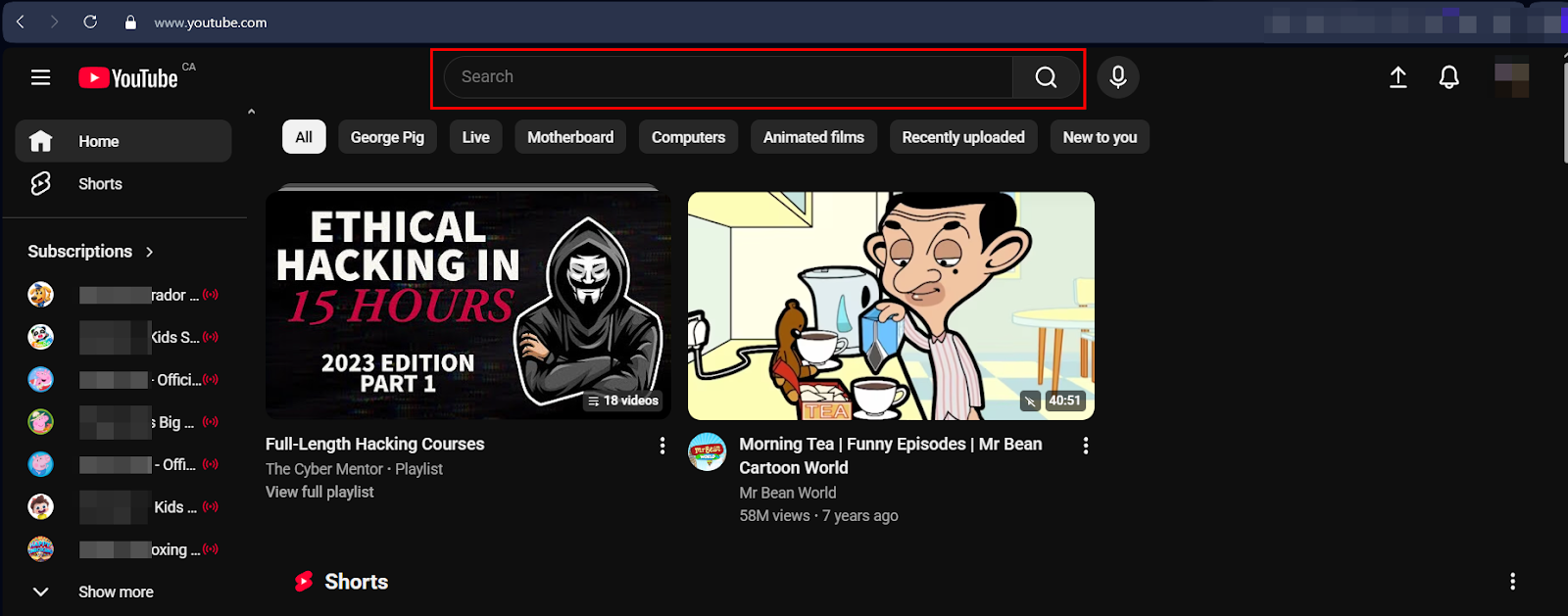
Figure 1 - YouTube search box – Web version
You are now ready to enter terms in the search box, such as keywords, lyrics, or a specific phrase. YouTube may provide search predictions based on popularity and your viewing history as you type. Hit the Enter button to search.
YouTube may display additional filters to help users refine their searches. For example, after a user searches for the keyword "OSINT," YouTube provides additional filters to narrow down the returned results, such as shorts, videos, unwatched, watched, and recently uploaded (see Figure 2).
Figure 2 - YouTube suggests additional filters when doing a basic search based on the entered keyword or phrase
Reverse Image Search on Video Thumbnails
Often during an investigation it is worth conducting a reverse image search on a specific screenshot from a YouTube video. To search for a YouTube video screenshot, first manually screenshot the frame you want to search or use a screenshot tool like Video Screenshot, a Chrome extension that enables users to capture full-frame screenshots of videos from YouTube, Netflix, Disney+, Vimeo, Hulu, and other platforms (see Figure 3).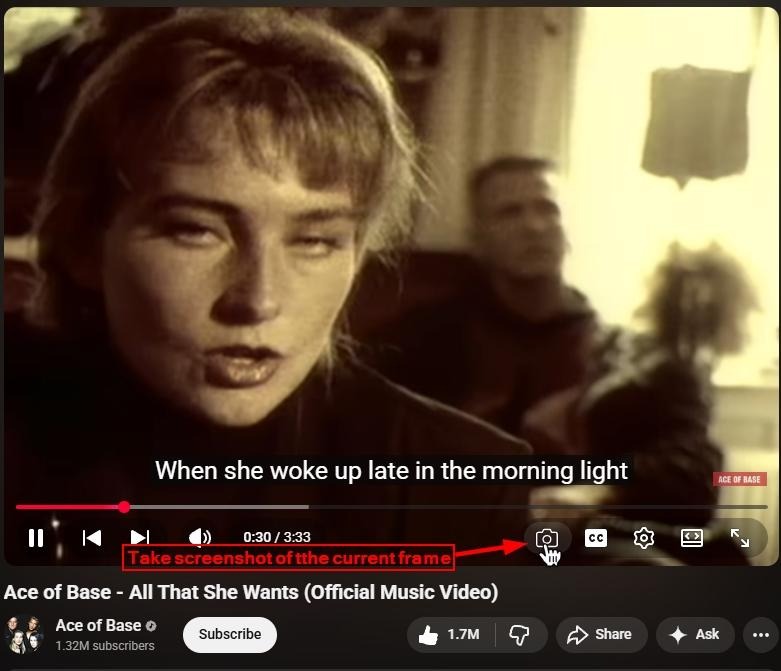
Figure 3 – Use the Video Screenshot Chrome add-on to conduct a reverse image search on a video screenshot.
After saving the screenshot, use any of the following reverse image search engines to conduct a reverse image search:
YouTube Advanced Search Filters
After you get your initial search results, you can refine them using filters. To access filters on YouTube’s web version, click the Filters button that appears below the search bar (see Figure 4).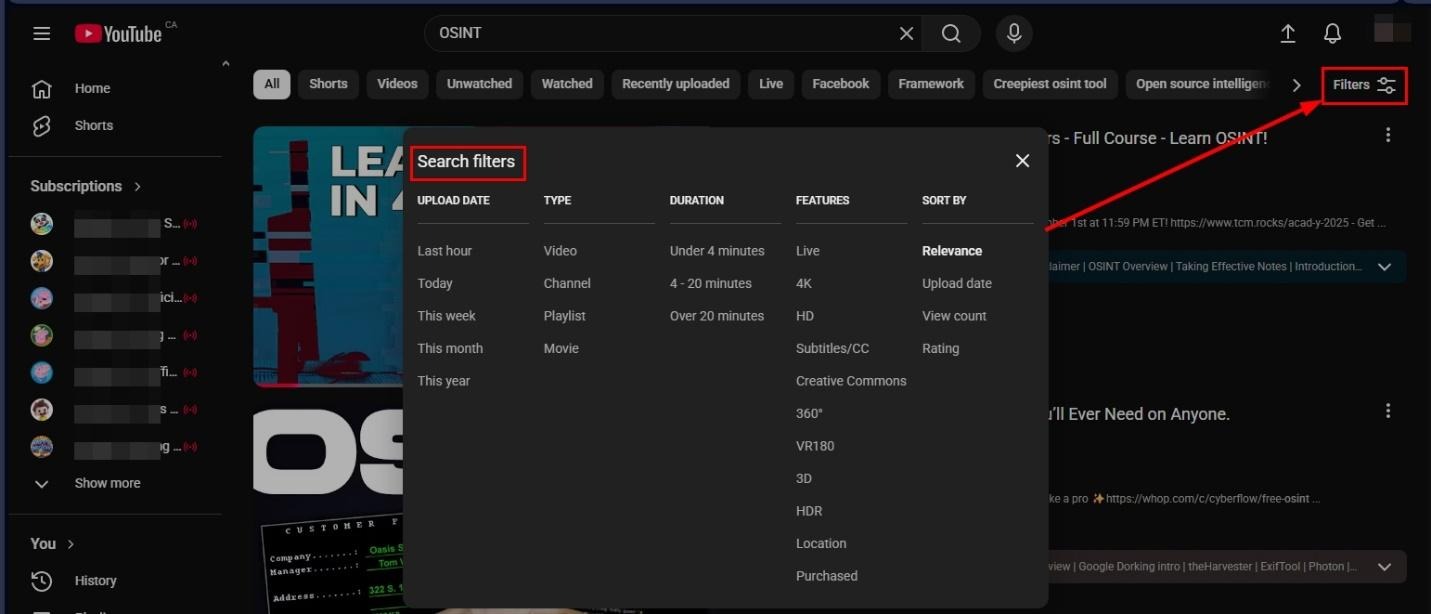
Figure 4 - Using YouTube advanced filters to refine search results
Here is a brief description of what each filter does:
UPLOAD DATE FILTERS
Last hour – Shows only videos uploaded within the past 60 minutes. Useful for finding breaking news, live streams that just ended, or the most current discussions on searched keywords and topics.
Today – Displays videos uploaded within the last 24 hours.
This week – Returns content uploaded in the past 7 days.
This month – Shows videos from the past 30 days.
This year – Displays content uploaded since January 1 of the current year.
TYPE FILTERS
Video – Standard video content of any length.
Channel – Searches for YouTube channels rather than individual videos. For example, searching "OSINT" with this filter would return channels dedicated to open-source intelligence, such as those run by OSINT trainers, investigators, or educational institutions.
Playlist – Returns curated playlists about the searched keyword. For example, searching "OSINT" using this filter may produce collections like "OSINT Tools Tutorial Series," "Beginner's Guide to OSINT," or "OSINT Conference Sessions 2025."
Movie – Shows feature-length content available for rent or purchase.
DURATION FILTERS
Under 4 minutes – When searching for "OSINT" using this filter, it will return brief content, such as quick tool demonstrations, short news updates, or rapid-fire tips. Good when you need fast answers or introductions to concepts and topics.
4-20 minutes – Medium-length videos.
Over 20 minutes – Longer, in-depth content. For example, a search for "OSINT" may produce comprehensive OSINT training sessions, full conference presentations, detailed investigations, or multi-topic educational videos.
FEATURES FILTERS
Live – Shows currently streaming content related to the searched keyword, such as real-time training sessions, Q&A sessions with OSINT experts, or live investigations.
4K – Returns videos filmed in 4K resolution (3840 x 2160 pixels).
HD – Shows videos in high definition (720p or 1080p).
Subtitles/CC – Returns videos with closed captions or subtitles.
Creative Commons – Returns videos released under Creative Commons licenses, which can be reused, remixed, or redistributed (depending on the specific license).
360° – Immersive 360-degree videos.
VR180 – Virtual reality content viewable with VR headsets.
3D – Stereoscopic 3D videos.
HDR – High Dynamic Range videos with enhanced color and contrast.
Location – Allows you to filter videos by the location where they were uploaded or tagged.
Purchased – Shows content you have previously bought (if any premium resources or documentaries were purchased through YouTube).
SORT BY FILTERS
Relevance (default) – YouTube's algorithm determines which videos best match your search query based on multiple factors, including title, description, content, and engagement.
Upload date – Sorts results chronologically from newest to oldest.
View count – Displays videos with the most views first. Helps identify the most popular content.
Rating – Shows highest-rated videos first (based on likes relative to views).
YouTube Search Operators
YouTube search operators are special search commands to help refine and narrow down searches on YouTube. Here are the most common ones:
- Quotation marks (""): This returns an exact match search.
- For example: "Learn OSINT" - This search query returns videos that contain the exact phrase "Learn OSINT" in the title, description, or tags.
- Minus sign (-): Excludes specific terms from your search results.
- For example: OSINT -gaming | This will show OSINT-related videos but exclude any results related to gaming and OSINT.
- Another example: intelligence gathering -artificial -AI | This searches for "intelligence" but excludes "artificial intelligence".
- OR operator (|): Searches for videos containing either one term or another.
- For example: OSINT | HUMINT - This returns videos about either Open Source Intelligence or Human Intelligence.
- Title search (intitle:): Searches for videos with specific words in the title only.
- For example: intitle:OSINT intitle:tutorial | This searches for videos with both "OSINT" and "tutorial" in their titles.
- URL search (inurl:): Searches for specific text within the video URL.
- For example: OSINT inurl:bellingcat | This searches for OSINT videos from Bellingcat's channel or videos with "bellingcat" in the URL.
- Asterisk (*): This serves as a placeholder for unknown words.
- For example: "OSINT * for beginners" | This might return results such as "OSINT tools for beginners," "OSINT techniques for beginners," or "OSINT framework for beginners."
- Channel-specific search (channel: or @): Searches within a specific channel.
- For example, searching for "@bellingcat Syria" on YouTube locates all Bellingcat videos about Syria.
- Before/After date operators: While not always reliable, you can sometimes use before:YYYY-MM-DD or after:YYYY-MM-DD.
- For example, OSINT Ukraine after:2022-02-24 attempts to locate videos about OSINT and Ukraine uploaded after February 24, 2022.
- Note: Using YouTube's built-in date filters is more reliable.
- Hashtag search (#): Searches for videos tagged with specific hashtags.
- For instance, #OSINT #geolocation identifies videos tagged with these hashtags.
Using Google Dorks to Search YouTube
Using Google Dorks to search within the YouTube platform may also prove helpful. Because certain YouTube content is indexed by Google (such as video descriptions and titles), you can use Google's search operators to locate specific content.
Here are some examples of Dorks-assisted search queries:
- site:youtube.com OSINT tutorial | This searches only YouTube for videos about OSINT tutorials. The site:operator restricts results to the YouTube.com domain.
- site:youtube.com "geolocation techniques" OR "geolocating footage" intitle:tutorial after:2022-01-01 | This searches YouTube for videos containing the exact phrases "geolocation techniques" or "geolocating footage," with "tutorial" in the title, uploaded after January 1, 2022. Useful for finding the latest training content on geolocation methods.
- site:youtube.com (OSINT OR "open source intelligence") (investigation OR verification) -gaming -cryptocurrency -trading –forex | This complex search finds YouTube videos about OSINT or open-source intelligence combined with investigation or verification terms, while excluding gaming, cryptocurrency, trading, and forex content.
- site:youtube.com inurl:watch "Ukraine" "verification" (BBC OR Reuters OR AP OR Bellingcat) after:2023-01-01 | Finds mainstream media or Bellingcat verification videos about Ukraine from 2023 onward.
- site:youtube.com (Ukraine OR Ukraina) ("war crimes" OR "human rights" OR "civilian casualties") (verification OR investigation OR evidence) (Bellingcat OR "Amnesty International" OR HRW OR ICC) | Finds videos from four reputable organizations investigating and verifying war crimes and human rights violations in Ukraine.
- site:youtube.com Ukraine ("Oryx" OR "equipment losses" OR "destroyed" OR "captured") (Russian OR "Russian army") (tank OR artillery OR "armored vehicle" OR aircraft) inurl:watch | Finds videos documenting and analyzing Russian military equipment losses, particularly those referencing Oryx's verified database. Note how to use inurl:watch to ensure you get actual video pages and not channel pages or playlists.
YouTube Transcript Features
The YouTube transcript feature allows OSINT investigators to search for keywords within YouTube videos. Here’s how to use it:
- Go to the YouTube video you want to search.
- Below the video title and description, look for a button that says "More", and click it to expand the full description.
- Select "Show transcript" (see Figure 5).
- A transcript panel will appear on the right side of the video.
- You may use the web browser's search function by pressing Ctrl+F (Windows/Linux) or Cmd+F (Mac) and entering the keyword you want to search for.
- When you find a highlighted result in the transcript, click it, and the video will automatically jump to that exact timestamp (see Figure 6).
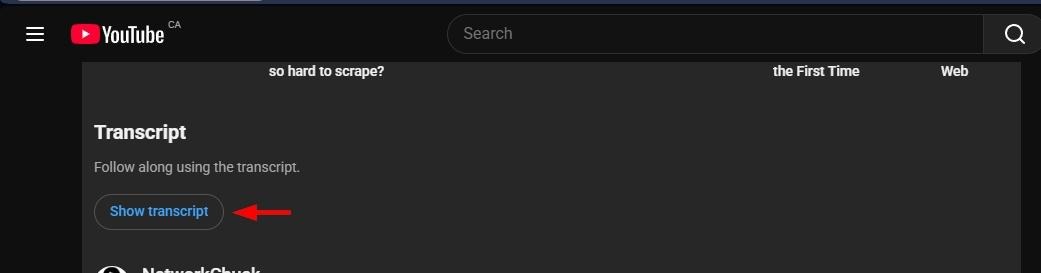
Figure 5 - Show YouTube video transcript button
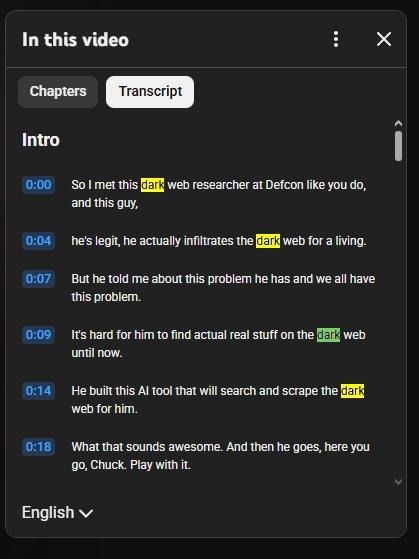
Figure 6 - Search within the transcript panel
Investigating a YouTube Profile
Any element of a YouTube channel’s profile can provide useful intelligence when conducting OSINT research. Here’s how to systematically analyze each component:
Inspecting Channel Profile Images
The channel profile picture can reveal information about the owner, such as affiliation, personal appearance, or intent. To inspect the image, right-click it and select "Save Image as.”
If the profile picture contains a personal image, you can conduct a reverse image search to see all online locations where the image appears. This could reveal additional social media profiles associated with the same user, professional websites, or news articles.
If the profile picture contains logos or symbols, such as corporate logos, organizational emblems, political symbols, extremist imagery, or group affiliations, such information can indicate the channel's purpose or backing. If the symbol looks small in the image, you may use any of the following image enlargement services:
A generic avatar as the profile image may indicate a bot account or an attempt to conceal the channel owner's true identity.
Inspecting Header Images
The YouTube channel banner or header image often contains clues about the channel's purpose and connections. Similarly to the channel profile image, you may conduct a reverse image search or enlarge it to view small text, symbols, locations, landmarks, or geographical features for geolocation purposes.
To obtain the full-resolution banner image, view the page source or use browser developer tools to locate the highest-quality version. This can be done by:
- Right-clicking over the banner image and selecting "Inspect Element."
- Copying the src attribute and pasting it into a new browser tab window (see Figure 7).

Figure 7 - View the YouTube channel banner image in full size
Inspecting the YouTube Display Name and Username
Similar to most social media platforms, YouTube channels have two identifiers: the display name (visible name) and the handle (username starting with @) (see Figure 8).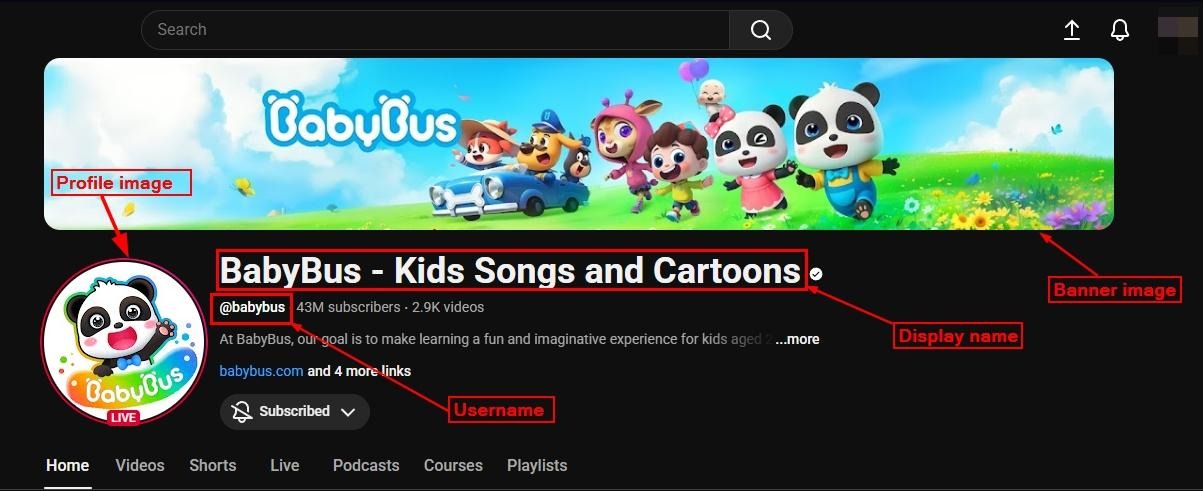
Figure 8 - YouTube username and Display name
The username appears in the profile URL (e.g., youtube.com/@username) and cannot be changed. Many users prefer to use the same username across different social media platforms, so it may help your research to conduct a reverse username search to see all profiles on other social media platforms where the same username is used.
Use these tools to perform cross-reference checks on usernames:
Users may change their display names after creating an account. Still, you should conduct a search to identify where relevant display names appear online, as this can yield additional leads for investigations.
Google Dorks can also be helpful in this context, for example”
- "John cartoon channel" filetype:pdf OR filetype:docx | Finds PDF or DOCX files anywhere online that contain the exact display name "John cartoon channel".
- intitle:"index of" "John cartoon channel" | Finds pages titled "Index of" (which indicates an open directory) that also contain the display name.
- "John cartoon channel" site:facebook.com OR site:instagram.com OR site:tiktok.com | Searches for the exact phrase (John cartoon channel) on the three major image/short-video platforms where a creator is most likely to have a secondary profile.
- "John cartoon channel" site:reddit.com OR site:forums.com OR site:quora.com | Restricts the search to Reddit, Quora, and general forum sites to find discussions or questions about the channel.
- intitle:"review" "John cartoon channel" intext:rating | Finds pages with "review" in the title and the channel name in the text, prioritizing pages that include the word "rating" to find critical content.
A display name may have certain meanings in specific cultures or languages. If you encounter a display name that seems unusual or unconventional, determining its meaning can provide valuable context regarding the account you are investigating.
Three reliable websites that provide the meanings, origins, and cultural context of names are:
- Behindthename
- Wiktionary
- Nameberry (While generally geared toward parents, it provides detailed origins, historical context, and modern associations for names).
Inspecting the YouTube Description or Bio
The "About" section contains the channel description, which often provides explicit information about the channel's purpose, location, and affiliations (see Figure 9).
Focus on the following areas when inspecting the bio:
- Manners in which the channel describes its mission, content type, political stance, or organizational affiliation.
- Email addresses, phone numbers, or instructions posted for collaboration/inquiries.
- The stated geographical location.
- Links to external resources like websites, social media, donation platforms, and other channels.
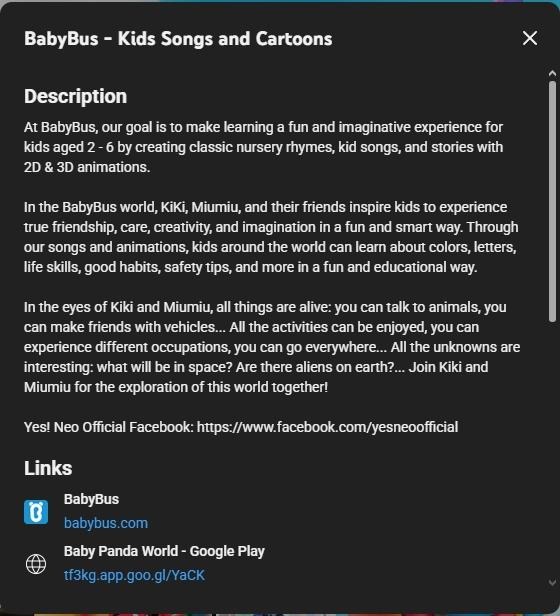
Figure 9 - Inspecting the YouTube channel Description section
You can start inspecting the description section by copying it and pasting it into Google Search to identify where else it appears online.
Additionally, you should extract and investigate all URLs, email addresses, and phone numbers mentioned in the description. For each email found, perform the following:
- Run exact-match searches on Google. For example: email@example.com.
- Search for the mail on other platforms. For example: site:linkedin.com email@example.com.
- Search Google to see if the email appears in public documents, such as PDF or MS Word files. "email@example.com" filetype:pdf.
- Determine whether the email appears in public breaches. Check the following data leak repositories:
- If the email uses a custom domain, check the:
- WHOIS records.
- DNS & infrastructure.
- Corporate footprint, such as company site and employee email pattern naming (*@company.com).
Inspecting the Profile Links Section
YouTube allows channels to display links to external websites and social media profiles. This section can be a goldmine for OSINT investigators, as it often provides:
- Links to profiles on social media sites like X, Instagram, and Facebook.
- Websites and blogs belonging to or associated with the channel owner, such as personal sites, news portals, organizational websites, and fundraising pages.
- Links to messaging applications such as WhatsApp, Telegram, Discord, or Signal.
For each domain name, conduct a WHOIS lookup to find registration information, hosting location, and owner details. Here are links to some resources for retrieving such information:
- ICANN (WHOIS lookup)
- Internet Archive (Wayback Machine) for restoring past copies of the website.
- Built With (Technology used to build the website)
- HostingChecker (identify the hosting provider of a website)
If the links section contains shortened links (bit.ly, tinyurl), expand them to see their true destination using services such as Unshorten.It! and ipvoid.
Inspecting the "More info" Section
The "More info" section displays statistical information (see Figure 10) about YouTube channels, including:
- Join date
- Channel country (as defined by the channel owner and not always accurate)
- Number of subscribers
- Number of videos uploaded to the channel
- Total number of views
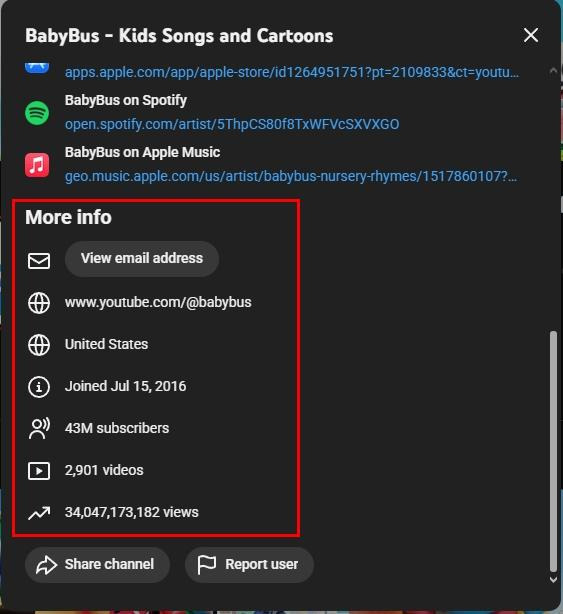
Figure 10 - Inspecting the "More info" section of the YouTube channel bio
You may also use a third-party service to retrieve even more statistical and historical information about the YouTube channel. Two popular services that accomplish this are:
Analyzing a YouTube Video
YouTube videos themselves are generally considered the primary evidence in OSINT investigations. A systematic approach to video analysis ensures OSINT gatherers extract maximum intelligence while preserving the integrity of their findings.
Here is how to conduct a professional and proper analysis of YouTube videos:
1. Collect Video Data
Before conducting any analysis, you should first collect and preserve all available data associated with the video. This creates a forensic baseline for our investigation.
Important data that may be relevant to your investigation include the following:
- Video URL (full URL)
- Video title
- Upload date and time
- View count, like/dislike ratio (if available), and comment count
- Video duration and resolution
- Channel name and URL
- All metadata that is visible on the page
- Thumbnail image
- Auto-generated captions/transcripts
- Engagement metrics at the time of collection
Several tools can help you save such information; the following are the most prominent ones:
- YouTube Metadata Bulk - Extract metadata from multiple videos simultaneously.
- YouTube Lookup – Retrieve different metadata about YouTube videos.
- YouTube Data Viewer – Retrieve specific details about YouTube videos and the channels that uploaded them, including the exact upload date and time. Automatically convert them to your country's time zone.
2. Download Videos
Downloading the video ensures you have a permanent copy for analysis, protecting you if the video gets removed from YouTube.
Here are some tools to download YouTube videos:
- Yt-dlp – A command-line tool for downloading audio and video content online, including YouTube videos.
- YouTube-dl – A command-line program to download videos.
- 4kdownload – A cross-platform app for downloading YouTube videos.
Disclaimer: If you are downloading videos for evidence collection purposes, you must use a tool that preserves chain-of-custody, captures all metadata, can be presented in native format with all context, prevents tampering, and ensures authenticity. Using a specialized tool like WebPreserver ensures your evidence will hold up in court.
3. Save Video Description, Comments and Channel information
Contextual information around a particular video is often as valuable as the video content itself (or moreso). The following sections typically provide the most useful information:
Video description
Make sure to copy the full description text into a document, and extract and document all URLs, email addresses, phone numbers, and social media handles.
Comments section
Here are some services to help download video comments, ensuring you have a permanent record of this crucial content:
- YouTube-comment-downloader – Simple script for downloading YouTube comments without using the YouTube API. The output is in line-delimited JSON.
- exportcomments.com – Exports all comments from YouTube posts to an Excel file (see Figure 11).
- WebPreserver - a simple browser plug-in that captures video content, comments, and replies in native context, with digital signatures to ensure evidence stands up in court.
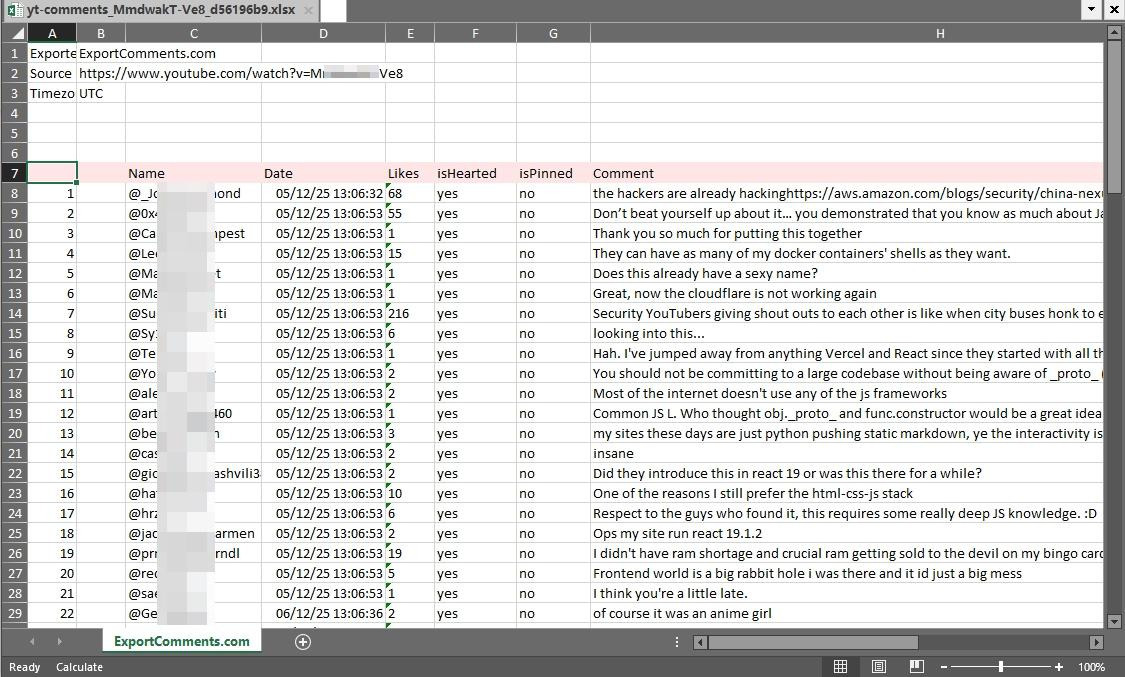
Figure 11 – Use ExportComments.com service to export YouTube video comments into an Excel file
Channel Information
Be sure to take the following actions:
- Save the entire "About" section of the channel.
- Document subscriber count at the time of investigation.
- List all linked social media and external websites.
- Take a screenshot of the channel homepage showing featured content, using tools such as Greenshot or WebPreserver.
- Note the channel’s join date and country (the latter of which is not always accurate).
A few specialized tools exist that can help OSINT inspectors preserve a comprehensive snapshot of the target YouTube channel, including:
- HTTrack – A website copier that can mirror the entire YouTube channel’s page.
- Browser extensions like SingleFile (Chrome/Firefox) that can save a complete page as a single HTML file.
Disclaimer: If you are capturing profiles, pages, or videos, for evidence collection purposes, you must use a tool that preserves chain-of-custody, captures all metadata, can be presented in native format with all context, prevents tampering, and ensures authenticity. WayBackMachine and other free tools are not sufficient for evidence. Using a specialized tool like WebPreserver ensures your evidence will hold up in court.
Additionally, here’s the protocol for saving pages using the Wayback Machine:
- Go to https://web.archive.org/save.
- Paste the full YouTube video URL.
- Click "Save Page Now.”
- Wait for confirmation and note the archived URL (see Figure 12).
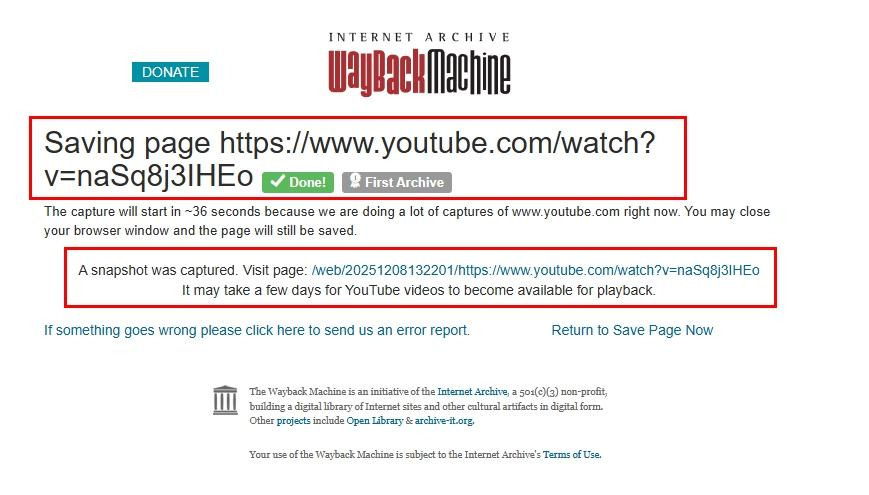
Figure 12 - Archiving a YouTube video using the Wayback Machine
Screenshot the channel page
Screenshots are often useful because they provide instant records of YouTube pages and capture layout, branding, and other context that might not be preserved in text archives.
4. Extract Video Metadata Information
Video metadata contains technical information that can reveal details about when and how the video was created and uploaded—and, potentially, its original location.
While YouTube removes most EXIF metadata (such as GPS location, camera model, and creation date), it’s still worthwhile to check the publicly available video file. The remaining data can sometimes reveal:
- Upload date (which may differ from the recording date).
- Unique video ID and file name.
- Codec information (the software used to encode the video).
Tools often used for this purpose include:
- ExifTool
- MediaInfo
- InVID/WeVerify Plugin (Chrome/Firefox
5. Extract Audio for Analysis
The audio in YouTube videos typically provides useful information like:
- Language of video subjects
- Accents
- Background sound
- Weapon fire
- Vehicle engines
- Environmental noise which can assist with verification and geolocation
Here are some tools for audio extraction:
6. Conduct a visual analysis of video content
Conducting a frame-by-frame visual examination may reveal details easily missed during normal playback. This thorough analysis is essential for geolocation and verification, among other things.
For example, in a visual analysis OSINT gatherers may look for:
- Environmental features such as architecture, building styles, and street furniture.
- Infrastructural components, including road markings and styles, traffic signs, and street signals.
- Clothing details, including styles and uniforms.
- Military equipment, unit patches, and weapon types.
A tool like FFmpeg can extract specific frames from videos.
7. Cross-Platform Verification
YouTube videos are frequently re-uploaded, shared across different social media platforms, stolen, and misattributed. Identifying the original source and all copies helps establish provenance and a timeline.
To find where a particular video appears elsewhere, use the following search techniques:
- Reverse image search of keyframes of the subject video.
- Search video titles and descriptions on other video-sharing platforms like TikTok and Instagram.
8. Video geolocation
Geolocation identifies the location of a video by matching visual details in the footage to real-world places. This is important for confirming claims.
Tools and online services that can aid in video geolocation include:
- Google Earth Pro
- Google Maps
- Yandex Maps
- SunCalc (enables users to determine the position of the sun at a specific date, time, or location)
- PeakFinder (identifies visible mountains or mountain ranges)
9. Inspect Potential Involvement with AI Deepfake Technologies
Video manipulation has advanced to the point of fooling even experienced investigators. Systematic analysis is necessary to spot synthetic or altered content. Tools to determine if a video is generated using deepfake technology include:
- Deepware Scanner
- Sensity (commercial platform for deepfake detection).
- Hive’s AI-Generated & Deepfake Content Detection APIs.
- Reality Defender
Collecting Legally-Defensible Evidence from YouTube
As we’ve demonstrated, YouTube is an incredible source for collecting digital evidence to support various investigation needs.
However, because YouTube evidence can disappear at any time, OSINT investigators should follow specific procedures when collecting evidence to ensure the defensibility of their findings:
- Capture entire videos and screenshots of relevant content, comments, likes, profile information, etc. including timestamps and metadata immediately
- NOTE: Screenshots and videos may not be defensible in court unless they include proper metadata, context and associated content and can be authenticated as genuine and unaltered. To capture this data in an authenticated format, consider using a web evidence capture tool like WebPreserver.
- Document the search process including the keywords used and the date/time when the evidence was captured to establish a transparent chain of custody.
WebPreserver for YouTube Investigations
WebPreserver is an online capture tool that allows you to capture anything you can find online, including Youtube videos, comment sections, and profiles, in just a couple of clicks. The browser plug-in automatically captures entire websites in native formatting, including all multimedia, links, and styling. Better yet – all evidence collected is complete with the appropriate metadata, digital signatures for authentication, and can be exported in native formatting, so you can present your evidence in context.
Learn more about WebPreserver here.
YouTube OSINT Investigations: Final Thoughts
YouTube has evolved over the past 20 years from an entertainment platform to a vital source of OSINT, providing relatively easy access to visual evidence of worldwide events. YouTube investigations can help investigators verify claims, document human rights abuses, and fight disinformation, if done correctly.
Succeeding in YouTube OSINT requires keeping up with changing technologies, including AI-generated video. Be sure to prioritize the preservation of evidence and adhere to strict verification standards. As platform features and manipulation technologies continue to evolve, make sure to keep your knowledge up-to-date.
Looking for more great OSINT Investigation Guides?
Check out our other great social media investigation guides:
- The Facebook OSINT Investigation Guide
- The Instagram OSINT Investigation Guide
- The TikTok OSINT Investigation Guide
- The X OSINT Investigation Guide
- The Reddit OSINT Investigation Guide
- The Discord OSINT Investigation Guide
- The WhatsApp OSINT Investigation Guide
- The LinkedIn OSINT Investigation Guide
- The Bluesky OSINT Investigation Guide
- The Dark Web OSINT Investigation Guide
- The Telegram OSINT Investigation Guide