



The dark web has emerged as a place for bad actors to commit all sorts of offenses, from selling drugs, firearms, and fake government documents to facilitating various types of cybercrimes. OSINT investigations that begin on the surface or ‘clear’ internet often lead to trails that must be followed onto the dark web.
Many OSINT professionals find it challenging to begin their investigations on the dark web because of its complex architecture. This complex architecture prevents conventional search engines from indexing its content and renders it inaccessible by traditional search methods.
In this guide, we’ll show you how to start an investigation on the dark web, focusing on the Tor network specifically, and cover the numerous security measures online investigators should follow to access the dark web safely and securely.
What is The Dark Web?
Before you begin a dark web investigation, it is helpful to understand the basic structure of the internet.
The internet (or the web) is composed of three layers: the surface (or clear), deep, and dark web.
The Surface Internet
The surface internet is what most people see when going online. It contains all websites that conventional search engines, such as Google, Yahoo, and Bing, can index and see.
People can access surface web content using regular web browsers (such as Firefox and Chrome) without making any configurations. The content on this layer is small compared to the total web content, and many studies estimate that it constitutes around 5% of the entire web.
Examples of websites available on the surface web include news sites, company websites, public social media profiles, blogs, publicly indexed documents, e-commerce listings, and educational resources.
These resources are considered a part of the surface web because they are publicly accessible, indexed by search engines, and do not require payment or login to access.
The Deep Web
The second layer is the deep web. This contains the majority of web content (around 90-95%). Similar to the surface layer, the deep web can be accessed using conventional web browsers; however, its content is not discoverable by search engines.
The deep web contains a wide array of content, such as private databases (including corporate intranets), subscription databases (LexisNexis, JSTOR), academic and scientific resources, banking portals, government systems (such as court document portals), cloud Storage, email systems (Gmail), and any content behind a paywall.
The Dark Web
The third layer is the dark web. Best estimates place the dark web at less than 1% of total web content, and it cannot be accessed with a standard web browser such as Firefox or Chrome.
Accessing the dark web requires specialized software or complex web browser configurations.
The dark web is famous for hosting illegal content, such as marketplaces for selling stolen credentials, fake government documents, illicit firearms, drugs, child sex abuse material (CSAM), and nearly any other criminal content you can imagine.
While much of the dark web is used for illegal activities, many people still use it for legitimate purposes. For example, journalists and human rights activists living in countries controlled by oppressive regimes often use the dark web for anonymity and to protect their identities.
It is worth noting that the dark web is not a single network. It exists across multiple networks (referred to as darknets), and each requires dedicated software or a special configuration to access.
The most prominent dark web network is Tor. Other famous networks include I2P and Freenet.
What is Dark Web Intelligence?
Dark web intelligence, also known as dark web monitoring, is the practice of collecting information from the hidden parts of the web to help detect and mitigate cyber threats and criminal activity. For instance, by monitoring hacker forums, investigators can identify attack tools, stolen credentials, and future attack plans.
Inspecting the dark web allows investigators to:
- Set up data breach notifications for instances when a target’s stolen data is advertised for sale on the dark web.
- Protect IP when counterfeited products appear for sale on the dark web.
- Detect threats before they cause harm.
- Detect security vulnerabilities and fix them before they are exploited.
Who Needs Dark Web Intelligence?
Gathering dark web intelligence has become an essential capability for organizations, cybersecurity teams across sectors, law enforcement, and investigators.
Threat Intelligence
Cybersecurity teams rely heavily on dark web intelligence in their work. They monitor threat actors' chatter across various dark web channels to understand their tactics, techniques, and procedures (TTPs), motivations, future plans, and vulnerabilities they tend to exploit.
For example, hackers often discuss zero-day or unknown vulnerabilities. A zero-day vulnerability is a software security flaw unknown to the vendor, meaning there's no patch or defense available when attackers discover and exploit it, giving developers "zero days" to fix it before it's actively used for attacks. This allows investigators to discover vulnerabilities in their systems weeks before public disclosure and, consequently, to patch them proactively.
Fraud Prevention
Financial sector companies are frequent users of dark web monitoring. Banks, payment processors, and e-commerce platforms often use dark web intelligence to detect and prevent fraud before it impacts their customers or operations. A credit card company may monitor the dark web for stolen credit card numbers. If they find their customers' card numbers advertised for sale, they immediately cancel the affected cards and issue replacements before fraudulent transactions occur.
Child Abuse Prevention
Monitoring the dark web allows law enforcement to detect and track criminal networks involved in producing and distributing child abuse material.
For example, organizations like the National Center for Missing & Exploited Children (NCMEC) work with international partners to use intelligence gathered from the dark web to identify and rescue victims who appear on child exploitation sites.
Digital Identity Protection
When an organization suffers from a data breach, cybercriminals may advertise stolen credentials for sale on dark web marketplaces. Identity theft protection services (such as Have I Been Pwned), corporate security teams, and individuals use dark web monitoring to find this information and alert users to take protective measures.
National Security
Security agencies and military organizations use dark web monitoring to identify threats to national security, such as terrorism, espionage, and state-sponsored cyber operations.
Cyber Insurance Evaluation
Insurance companies are increasingly adopting dark web monitoring. By tracking compromised credentials, exposed business data, references to business assets, and content associated with targeted threats, companies obtain insights about their risk profile. This intelligence allows them to refine premium pricing, validate the authenticity of reported incidents, and identify undisclosed vulnerabilities that may influence coverage decisions.
Critical Infrastructure Protection
Operators of critical infrastructure, including energy grids, water utilities, transportation systems, and telecommunications networks, often rely on dark web intelligence to identify threats before they lead to physical or operational disruption.
By monitoring hidden dark web forums, ransomware negotiations, and conversations about ICS/SCADA vulnerabilities, security teams can detect early signs of targeting. This includes the sale of network access, exposed employee credentials, and discussions about exploiting specific industrial technologies.
Dark Web Intelligence Limitations & Challenges
While dark web monitoring provides a critical utility for security teams in detecting and preventing new threats, working in such an environment poses serious challenges. Below are some of the notable challenges OSINT practitioners encounter when gathering intelligence from the dark web:
1. Anonymity
The fundamental purpose behind the dark web is online anonymity. This selling point for users translates into major challenges and frustrations for investigators.
More specifically, major anonymity challenges include:
- Attribution: The Tor dark net routes its traffic through three nodes or relays (entry → relay → exit). Consider each relay a server; each server assigns a different IP address to your connection. This makes tracing activities on the dark web to a specific individual extremely difficult.
- Different online identities: Unlike the surface web, where users often reuse the same username across platforms, criminals on the dark web frequently use a different username for each service.
- Cryptocurrencies: Criminals may use cryptocurrencies, such as Bitcoin, to power their criminal operations; others simply use them to purchase and sell goods and services on the dark web. Tracing Bitcoin transactions is extremely resource-intensive, and some cryptocurrencies, such as Monero, are almost impossible to trace.
2. Data Accuracy
The dark web is rife with misinformation and scams, making it difficult for OSINT analysts to distinguish legitimate intelligence from noise.
The key challenges of data accuracy include the following:
- Scams: Many people and companies operating on the dark web sell non-existent products and services. For example, a cybercrime group may announce to have a "complete database" from a recent data breach of a particular company; in the end, the content might be previously leaked data repackaged to appear new.
- Disinformation: The volume of disinformation on the dark web is significant. State-sponsored actors and organized criminal groups routinely post fake information on discussion forums to mislead investigators and waste their resources.
- Old information: The dark web is full of outdated information and intelligence. If OSINT investigators lack expertise, they may chase outdated information that yields nothing.
- Government honeypots: Some dark web websites may include government honeypots used to catch cybercriminals and study their tactics. OSINT analysts should be careful to identify such websites before committing resources to investigate legitimate entities.
3. Technical Barriers
Investigating the dark web requires technical expertise and knowledge that many companies and individual investigators lack.
Major technical challenges appear in the following areas:
- Complex architectures: Accessing dark web networks such as Tor and I2P requires specialized software and may require custom browser configurations. Failing to perform this task correctly may reveal an investigator's identity or make certain dark websites inaccessible.
- Unstable infrastructure: Darknet websites do not use conventional web hosting. Some websites could be accessible today and later go offline or shut down permanently. An OSINT investigator may discover valuable intelligence, only to find it unavailable when returning days later. The lifespan of a darknet website is measured in days and months—not years.
- Unindexed content: Conventional search engines cannot index content on the dark web. Although there are specialized dark web search engines, they index only a fraction of the dark web, and most of their results are outdated and unsuitable for intelligence purposes.
- Performance issues: Accessing darknet websites is a slow process; you can expect connection speeds similar to dial-up connections from the early days of the internet. This makes navigating different websites a time-consuming, daunting process and frustrating for investigators.
- Closed communities: Most valuable intelligence on the dark web resides in discussion forums, which usually require an invitation to access. This limits an investigator's ability to inspect such communities and creates additional technical barriers.
4. Legal and Ethical Considerations
OSINT investigators operate in a gray area between legal intelligence gathering and illegal activity when performing investigations on the dark web.
This uncertainty stems from the following:
- Jurisdictional borders: Dark web operations commonly span multiple national jurisdictions. Unlike the surface web, where a website's hosting infrastructure is typically located in one or more identifiable countries, dark web services often rely on distributed, anonymized infrastructure across multiple regions. As a result, an investigator operating in one country may monitor a hidden service hosted in another, while the individuals operating it reside in a third jurisdiction. This fragmentation complicates the determination of applicable laws and investigative authority.
- Electronic access laws: Accessing dark websites may violate computer laws in some countries. For example, in the US, unauthorized access to dark web services that offer stolen credentials and credit card numbers is generally illegal under the Computer Fraud and Abuse Act.
- Digital evidence management: When monitoring dark web services, investigators often must download and store digital incriminating evidence, such as child exploitation images. Such evidence needs special handling to avoid legal liability.
How To Access The Dark Web for OSINT Investigations
In this section, we outline the steps to access the dark web—specifically, the Tor network, the most widely used dark web network that hosts the majority of dark web sites and services OSINT investigators typically need to access.
Install and use the Tor Browser
The first step is to install the Tor Browser (see Figure 1). This is a Mozilla Firefox-hardened web browser that incorporates the Tor software. Tor Browser is available for Windows, macOS, Linux, and Android platforms.
The installation process is straightforward; simply download the installer for your operating system and follow the installation wizard. After you open it, all your traffic through this web browser is automatically routed through the Tor network.

Figure 1 - Tor Browser home page
How To Access the Dark Web Securely and Anonymously
Accessing the dark web is associated with serious risks.
Malware distribution is widespread on dark websites. Many marketplaces and forums host malicious downloads, drive-by exploits, and phishing schemes that compromise visitors. Exit nodes can also be malicious, and hackers can potentially intercept unencrypted traffic on these nodes.
And without proper precautions, users can expose their identities through IP leaks, browser fingerprinting, or operational security mistakes.
Here is how to securely access the dark web through Tor:
1. Mask your IP address via a VPN service
The first step is to hide your IP address before accessing the Tor network. While Tor already provides high anonymity, using a VPN will add an additional layer of protection.
Without a VPN, your internet service provider (ISP) will know you are accessing the Tor network. While accessing the Tor network is legal, some ISPs may consider accessing the dark web suspicious. A VPN helps you mask your network entry.
The Tor entry node can also see your actual IP address, but it cannot see your destination. If the entry node is malicious or compromised, it can detect that you are accessing Tor, making using a VPN essential.
2. Use a virtual machine (VM) to host the Tor Browser
It is highly recommended that you run the Tor Browser within a virtual operating system environment.
A virtual machine (VM) is a software-based, virtual computer that runs on a physical computer (host), acting like an isolated, independent machine with its own OS, apps, and storage, using a slice of the host's hardware resources (CPU, RAM, disk).
This helps you isolate your dark web activities from the host operating system.
Using virtualization can help you with:
- Isolating malware: If you access a dark web service that hosts malware, downloading it into your virtual machine will cause no damage to the underlying operating system or network.
- Fast recovery: Virtual machines let you take system snapshots. This means before running something risky, like a potentially malicious program, you can save a snapshot of the virtual machine’s stable state. If an infection occurs, you can revert to that saved snapshot.
- Forensic separation: Conducting dark web monitoring may involve downloading files, taking screenshots, and visiting services. These activities leave digital traces on your computer. By isolating these activities on a separate, dedicated machine, you prevent these traces from mixing with those on your primary workstation. This separation is critical for preserving the integrity of digital evidence.
- Multiple identities: You can create a separate VM for each investigation. This allows you to separate your online identities according to each investigation's requirements.
3. Use a managed attribution service
When conducting dark web monitoring for governments and organizations, it is better to use a managed attribution service.
A managed attribution service controls your online digital footprint, allowing you to manipulate technical details like your IP address, device type, and browsing behavior.
This cloud-based offering provides investigators with a secure, ephemeral, and isolated browsing environment designed for sensitive intelligence-gathering operations. By shifting risk from the local network to the cloud, these services offer a layer of operational security and forensic cleanliness that is difficult to achieve with on-premise solutions.
The main features of managed attribution services include:
- Infrastructure isolation: Everything is run on the cloud using the provider's IT infrastructure and is isolated from the client network.
- Anonymized environment: The cloud service masks the investigator's real IP address and other identifiers. Investigators can also change their IP address and device digital fingerprint at will for each browsing session.
- Ephemeral sessions: Each investigative session can be launched from a clean state. The environment is discarded after each use, ensuring no persistent traces, malware, or cookies remain.
- Tools for data capture: The managed attribution service typically contains specialized tools for downloading files, taking screenshots, and recording sessions. This simplifies investigators’ work and keeps evidence material contained in a single place.
4. Use specialized operating systems
For maximum security and anonymity on the dark web, it’s best to use specialized operating systems designed specifically for secure, anonymous browsing, as they provide superior protection. Examples of such operating systems include:
- Tails: Developed by individuals behind the Tor Project.
- Whonix: Runs like an app inside your operating system.
- Qubes: Qubes OS leverages Xen-based virtualization to create and manage isolated compartments called qubes.
5. Isolate your hardware
To achieve the highest level of security and privacy, it is recommended to use a dedicated computer for dark web monitoring. This minimizes the risk of cross-contamination between investigative environments and corporate or personal systems.
A dedicated device allows investigators to isolate storage, network interfaces, and user accounts, thus reducing exposure to malware, tracking mechanisms, and accidental data leakage. Hardware isolation also supports stronger OPSEC practices and ensures that any compromise remains contained within a controlled environment.
Individuals conducting dark web monitoring often dedicate a laptop to this task; a used business laptop, for instance, should suffice.
6. Ensure Tor configuration best practices
Even with isolation and anonymization measures in place, it is essential to harden the Tor Browser itself to maintain the highest possible level of anonymity and operational security. Here are the main areas to strengthen:
Security levels
The Tor Browser comes with three security levels that balance functionality against security. You can access this setting by clicking the shield icon in the top-right corner (see Figure 2).
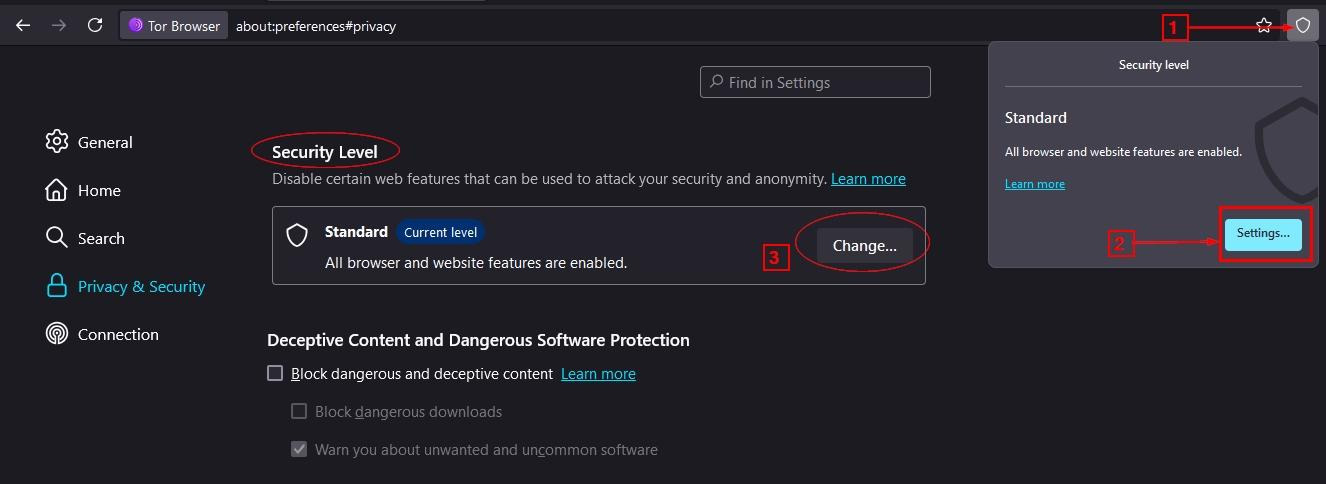
Figure 2 - Changing the Tor Browser Security Level
The three security levels are:
- Standard (Default): At this level, all browser features are enabled, including JavaScript, for all sites. This level is convenient for regular usage; however, it is the least secure.
- Safer (Recommended for most OSINT investigations): In this level, JavaScript is disabled on non-HTTPS sites, some fonts and math symbols are disabled, and audio/video content requires manual activation. Certain website features may not function correctly under this setting.
- Safest (Recommended for high-risk operations): At this level, JavaScript is disabled across all websites, and most site features are disabled. The level provides maximum security; however, many websites' functionality will break.
Circuit management
Tor routes traffic through three relays (nodes) called a circuit, to anonymize your online activity, acting like layers of an onion to hide your IP address and browsing habits from observers. Each node (entry guard, middle, exit) only knows its immediate neighbors, preventing any single point from seeing the entire path from you to the final website
Tor’s browser changes circuits periodically to prevent profiling and linkability, making it harder for adversaries to track activity over time.
Users can, however, change circuits using the new identity feature. When selecting "New Identity", the Tor Browser closes all tabs, clears session data (cookies, cache, DOM storage), and creates entirely new circuits for all subsequent activity.
Tor circuit flows through three nodes:
- Entry (Guard) node: First node in circuit; sees your real IP (if you are using VPN, it will see the VPN IP address).
- Middle node: Intermediate relay; sees neither source nor destination.
- Exit node: Final relay; sees destination but not source
To view your current circuit, click the site information icon next to the URL to see the current circuit path (see Figure 3).

Figure 3 - Viewing the current Tor Browser circuit
To create a new circuit, do the following:
- New circuit for current website: Click Tor Circuit information icon → "New Tor circuit for this site."
- New identity: Click the broom icon in the top-right corner of the Tor Browser toolbar (closes all tabs and creates a new circuit; see Figure 4).
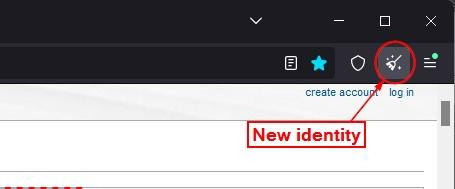
Figure 4 – Execute New Identity in Tor Browser
It is worth noting that investigators should check the circuit exit node country when creating a new circuit, as some websites restrict access by geography.
7. Test for leaks
Before starting any dark web investigation, check that your anonymization measures are functioning properly. Even with all precautions in place, misconfigurations can reveal your true identity.
Here are the areas you should test for leaks:
- IP address leaks: If your real IP address leaks through Tor, it can reveal your location and ISP.
- DNS leaks: DNS queries bypassing Tor and going directly to your ISP's DNS servers would reveal the sites you are visiting.
- WebRTC leaks: The Web Real-Time Communication (WebRTC) protocol can reveal your local and public IP addresses via browser APIs.
- Time zone leaks: If the browser reports your actual time zone rather than UTC, it can narrow your location.
- Browser fingerprinting: Your unique browser and device digital fingerprint can identify you across sessions. You should check what, exactly, your current browser and device settings reveal about you.
Various online services allow you to view your current IP address and browser fingerprint. These tools help verify whether your browser or device is leaking technical information that could enable external parties to identify your true identity.
12 Safety Tips For Navigating the Dark Web
Even after you have properly configured anonymization tools and verified security measures, maintaining operational security while navigating the dark web requires constant vigilance.
Below is a list of tips for online investigators to stay secure when navigating the dark web.
1. Connect via VPN service
Always establish a VPN connection before launching the Tor Browser. This helps you hide your entry to the Tor network.
2. Check your company's policies before accessing the dark web
Before you start any dark web investigations using your organization's equipment or networks, carefully review your company's acceptable use policies, security guidelines, and legal requirements. Policy violations can lead to termination—even if your intentions were legitimate.
3. Avoid downloading files
A critical safety rule for dark web browsing is avoiding file downloads unless absolutely necessary; when you must, do so with extreme precautions.
File downloads on the dark web present a serious security risk:
- High malware prevalence: Dark web files are frequently infected with malware, such as trojans, ransomware, keyloggers, and spyware.
- Deanonymization attacks: Bad actors may try to use malicious files to attempt to reveal your real IP address or system information.
- Legal liability: If downloaded files contain illegal content (such as child exploitation or classified documents), you could experience serious legal consequences.
- System compromise: Even if you use virtual machines, sophisticated malware could potentially escape or gather intelligence about your operations.
The most dangerous downloads include the following file categories:
- Executables and scripts (.exe, .bat, .sh, .js, .vbs)
- Documents with macros (.doc, .docm, .xls, .xlsm, .pdf)
- Archive files (.zip, .rar, .7z, .tar.gz)
- Browser extensions and plugins
4. Check URLs before clicking
Dark web URLs are especially vulnerable to manipulation and spoofing. Investigators should verify URLs carefully before clicking any links.
This is important to avoid:
- Phishing sites: Dark websites often host fake login pages designed to steal credentials.
- Malware distribution: Malicious links may redirect visitors to sites that automatically download malware.
- Doxing operations: Malicious sites may also attempt to reveal visitors' identities using various fingerprinting techniques.
Before clicking any links, do the following:
- Hover before clicking: Put your mouse over links to preview the URL in the browser status bar (bottom-left corner—see Figure 5).
- Copy and inspect: Right-click the link, copy the URL, and paste it into the text editor to examine carefully.
- Check against known-good URLs: Compare against verified URL lists from trusted sources. Dark.fail provides a directory of verified Tor web services.
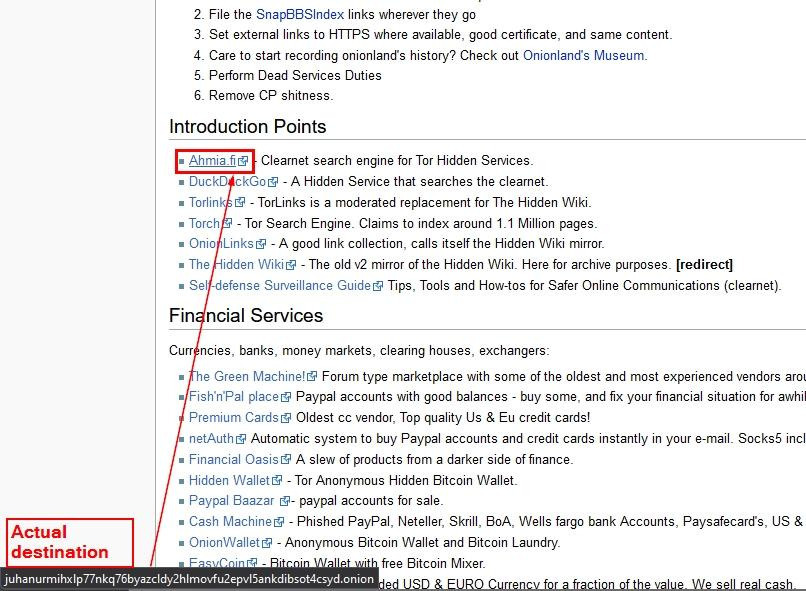
Figure 5 - Hover over the link to reveal the actual URL destination in the bottom left corner
5. Disable JavaScript
JavaScript is one of the biggest security and anonymity risks when accessing the dark web. Disabling it should be a standard practice for all dark web investigations. JavaScript leaves users vulnerable to:
- Deanonymization attacks: Executing JavaScript within the Tor Browser can reveal your real IP address through various techniques used by bad actors.
- Browser fingerprinting: JavaScript can facilitate the sophisticated tracking of your unique browser characteristics.
- Exploit delivery: Many types of malware attacks exploit JavaScript vulnerabilities to infiltrate computing devices.
- User tracking: Scripts can be used to track your behavior across sites. Users with malicious intent can correlate your activities and track your entire online behavior, which could reveal your true identity.
- Resource hijacking: JavaScript can be used to run malicious scripts on your computer, such as cryptocurrency miners, without your knowledge, and consequently consume your computing resources.
To disable JavaScript in your Tor Browser, go to the security level and select "safer" or "safest".
The recommendation is to use "Safest" by default. Only temporarily reduce to "Safer" or "Standard" when absolutely necessary for specific functionality.
6. Use a Privacy-Oriented Operating System
The operating system you use to access the dark web has a substantial effect on your security. Privacy-focused operating systems are designed to prevent leaks, address breaches, and keep you anonymous. Tails, from the Tor Project, is generally considered the best.
7. Keep OS and Applications Current
Keeping the host operating systems, installed applications, and the virtual machine hosting the Tor Browser up to date is one of the most critical yet commonly overlooked security practices for dark web investigators.
Ensuring everything is current is important as it ensures you have all of the most recent security updates patch vulnerabilities that attackers could use for exploitation. Tor Browser updates often include critical anonymity and security fixes that help investigators remain anonymous and secure when browsing the dark web. Updates prevent known malware from gaining footholds and ensure system integrity.
While not 100% foolproof, updated software reduces exposure to newly discovered threats.
8. Never Use Personal Accounts or Credentials
One of the most important rules for operational security in dark web investigations is to keep your personal identity separate from your investigative work.
Information that’s considered "personal" and, therefore, should not be used includes:
- Email addresses: Gmail, Outlook, Yahoo accounts, work email addresses with your real name, and any other email addresses tied to your real identity.
- Usernames: Social media handles, gaming usernames, forum names from surface websites, and any username associated with your real identity.
- Passwords: Including variations of personal passwords and password patterns you use elsewhere.
- Payment methods: Personal credit or debit cards, PayPal or Venmo accounts in your name, bank accounts, and any payment method tied to your identity.
- Phone numbers: Personal mobile phone, work phone, and any numbers linked to your name.
- Personal information: Anything personal related to you, such as your real name (or nicknames), birthdate, actual location, biographical details, photos of yourself, or details about family, work, and hobbies.
9. Use a Temporary Email Address
When dark web investigations require the use of email, use temporary or anonymous addresses to avoid linking to your real identity. This helps keep your operational security intact and protects your identity.
Here are some temporary email services:
- TemporaryMail
- EmailOnDeck
- Alt Address (Free disposable email address hosted on the Tor network.)
- Onion Mail (Tor email service; no personal data is required to create an account, and emails are encrypted with your PGP public key.)
10. Disable Cookies and Clear Data after Sessions
Cookies and persistent browser data can allow threat actors to track your activity across the dark web. It is critical to disable them after each session.
The Tor Browser is already configured with strong privacy by default:
- No browsing history saved.
- Cookies cleared on exit (unless you allow them).
- No form data saved.
- No passwords saved.
- Regularly cleared cache.
Still, it is important to access the Tor Browser settings and verify these options. Here are the steps to do so:
- Open the Tor Browser.
- Click the three horizontal lines on the upper right corner of the address bar → Settings (see Figure 6).
- Navigate to the Privacy & Security section.
- Verify the following:
- History section: Select "Never remember history."
- Cookies and Site Data: Ensure this option is checked: "Delete cookies and site data when Tor Browser is closed."
- Logins and Passwords: Uncheck the "Ask to save passwords" option.
- Permissions: Block all location, camera, microphone, and notifications. (see Figure 7)
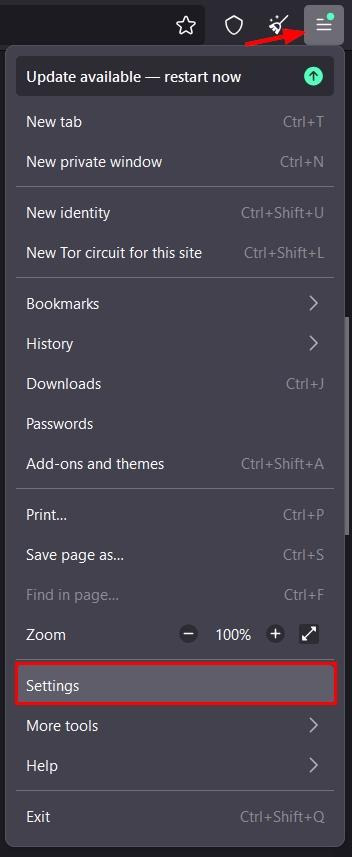 Figure 6 - Access Tor Browser settings
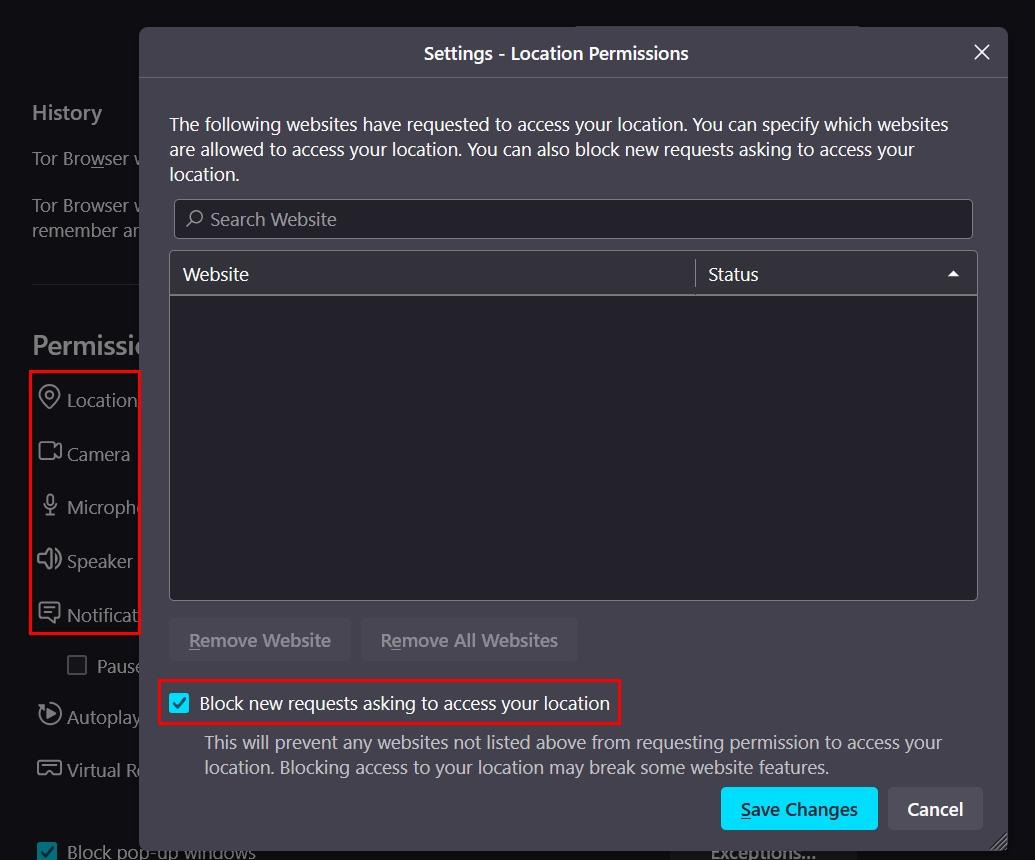
Figure 7 - Manage Tor Browser access permissions
11. Use Encrypted Communications
When dark web investigators need to communicate directly with sources, informants, or other parties, they should use encrypted channels to protect their communications. This helps protect sensitive information and keep operations secure.
These communications should always be protected:
- Source communications: Includes communications with informants, whistleblowers, and anyone who wants to provide intelligence.
- Team coordination: Communications with other investigators working on the same case.
- Marketplace interactions: Sensitive discussions with vendors or administrators.
- Forum private messages: Direct messages on dark web forums.
- Evidence sharing: The transfer of sensitive investigative findings between different investigators.
Essential tools and online services to protect your dark web communications include:
- Encrypting emails using (PGP or GPG). An alternative, easy solution is using ProtonMail on the Tor network.
- Using Signal for messaging.
- Using encrypted paste services such as Privatebin.
- Using OnionShare to share files over the Tor network.
12. Close all open applications before accessing the dark web
Reducing the number of running applications before accessing the dark web lowers your risk of attacks and helps prevent information leaks from unpredictable sources.
Running applications can leave confidential information in system memory and other areas. They can also persist outside the Tor Browser and, if accessed by malware or forensic tools, may expose aspects of your activity on the dark web.
In some cases, background application activity (e.g., torrent downloads and uploads) can generate non-Tor network traffic on the same computer while the Tor Browser is running. A threat actor with access to information collected from background activity could then correlate it with operational activity to unmask the user's real-world network identity.
Running multiple active applications on the same computer also increases the risk of resource contention, reducing operating system stability. As a result, the effectiveness of security controls (e.g., endpoint protection, firewalls, and monitoring tools) can be compromised.
Navigating the Dark Web
After creating an environment that enables secure access to the dark web, the next step is to learn how to navigate the Tor network effectively.
As the dark web is not like the surface web that uses conventional search engines to navigate and access information, the dark web requires different techniques and tools.
In this section, we will cover some of the most notable resources for finding information on the Tor network. But before we start, we need to introduce the top-level domain of the Tor darknet, “.onion”.
Understanding .onion Addresses
The Tor network uses a different naming convention from the surface internet. While the clearnet, or surface internet, uses top-level domains like .com, .net, and .info, the standard domain name for the Tor network is ".onion".
The ".onion" domain names are special-use top-level domains that identify anonymous hidden services accessible only through the Tor network. These domain names are not part of the regular Domain Name System (DNS) and are not accessible through regular web browsers.
Onion addresses have the following characteristics:
- Only accessible through Tor: You cannot access .onion sites using conventional web browsers like Chrome, Firefox, or Safari without the Tor network.
- End-to-end encryption: The connection between the client and the hidden service is completely encrypted.
- Bidirectional anonymity: Both the visitor and the service operator remain anonymous.
- No central registry: No organization controls .onion addresses; the ICANN organization, for instance, controls regular domains on the surface web.
Dark Web Search Engines
Unlike the surface web, where Google, Bing, and other major search engines index billions of pages, the dark web does not have full indexing. While dark web search engines have significant limitations, they are still important tools for OSINT investigators.
Major dark web search engines include:
- Ahmia.
- Torch.
- DuckDuckGo Onion Service (DuckDuckGo .onion does NOT search .onion sites—it searches the clearnet).
Dark Web Directories and Wikis
While search engines try to index dark web content using search algorithms, directories and wikis provide human-curated collections of .onion links organized by category.
- OnionLinks.
- Hidden Wiki. (See Figure 8)
- TorLinks.
- Dark.fail.
- Tor.taxi.
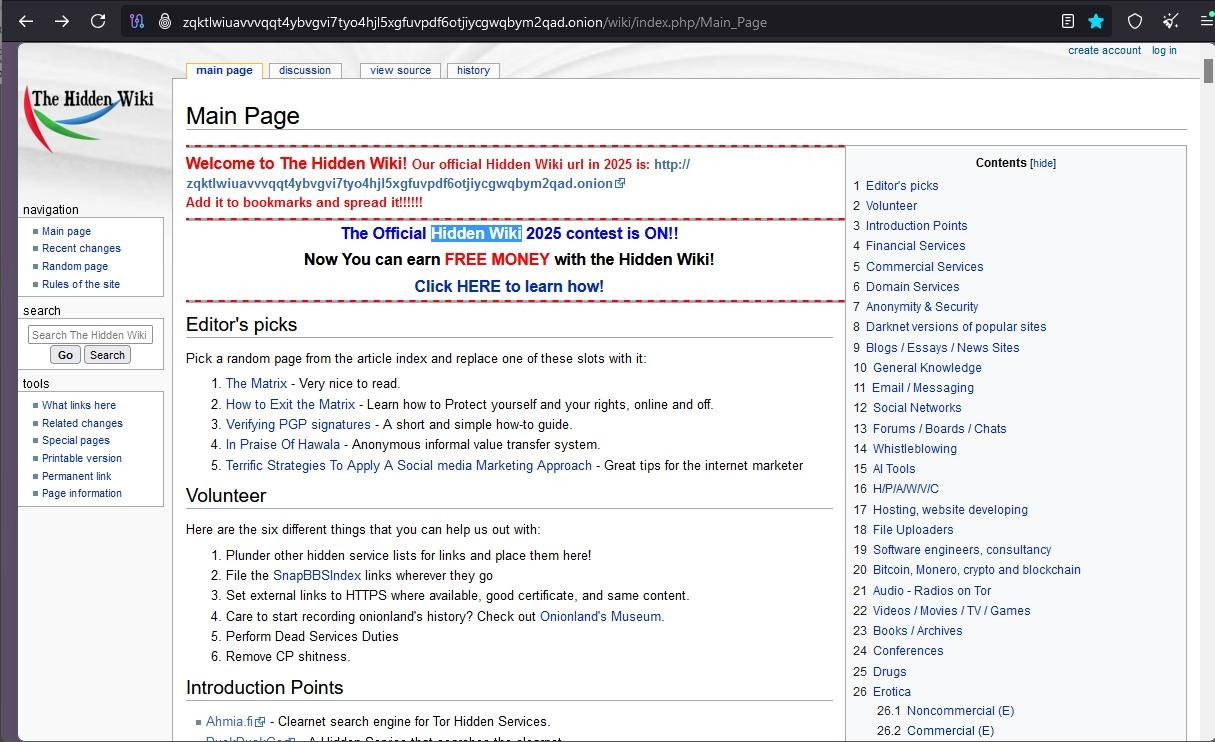
Figure 8 - The Hidden Wiki
Forums and Marketplaces
Forums and marketplaces are two common types of sites on the Tor darknet. These platforms often facilitate serious criminal activities. Access to these directories is often crucial for investigators, though, as they may have links to useful content.
Verifying the Accuracy of Data Collected from the Dark Web
Simply finding data on the dark web is not sufficient; you must verify and enrich it to produce actionable intelligence.
Here is a suggested methodology for verifying such data:
1. Cross-reference with sources from the dark web itselfBefore moving to the surface web, see if the dark web confirms its own stories. For example, is the same dataset, username, or claim being discussed on different hacking forums?
2. Check data date and timeDoes the leaked data found on the dark web include creation or modification dates that align with the claimed breach date?
3. Cross-referencing with the surface and deep webCheck sources on the surface web, such as Have I Been Pwned (HIBP) and pastebin/data-dump websites, to determine whether a particular data breach already appears on those sites. Remember that old data breach information on the darknet is sometimes repackaged and sold as new.
4. Have you antenna up for red flags for unreliable dark web dataFor example, “a complete database of [Major Bank]" sold for only $1000.” Be careful when the threat actor's story changes across different hacking forum posts.
Collecting Legally-Defensible Evidence from the Dark Web
As we’ve demonstrated, the Dark Web is an incredible source for collecting digital evidence to support various investigation and organizational cybersecurity needs.
However, because Dark Web evidence can disappear, OSINT investigators should follow specific procedures when collecting evidence to ensure the defensibility of their findings:
- Capture screenshots of relevant content, including timestamps and metadata immediately, as it could quickly disappear
- NOTE: Screenshots may not be defensible in court unless they include proper metadata, context, hyperlinks and can be authenticated as genuine and unaltered. To capture this data in an authenticated format, consider using a web evidence capture tool like WebPreserver.
- Document the search process including the keywords used and the date/time when the evidence was captured to establish a transparent chain of custody.
WebPreserver for Dark Web Investigations
WebPreserver is an online capture tool that allows you to capture anything you can find online (including the dark web) in just a couple of clicks. The browser plug-in automatically captures entire websites in native formatting, including all multimedia, links, and styling. Better yet – all evidence collected is complete with the appropriate metadata, digital signatures for authentication, and can be exported in native formatting, so you can present your evidence in context.
Learn more about WebPreserver here.
Dark Web OSINT Investigations: Final Thoughts
Dark web OSINT requires discipline, operational security, and making informed decisions.
The same anonymity that safeguards investigators also shields criminals. This makes accuracy, verification, and operations security absolutely essential. Investigators can gather valuable insights while reducing legal, technical, and personal risks by understanding the dark web's structure, enforcing strict security measures, and carefully validating information.
Dark web intelligence can be an incredible tool, but it comes with risks that must be approached methodically, ethically, and with a clear investigative goal.
Looking for more great OSINT Investigation Guides?
Check out our other great social media investigation guides:
- The Facebook OSINT Investigation Guide
- The Instagram OSINT Investigation Guide
- The TikTok OSINT Investigation Guide
- The X OSINT Investigation Guide
- The Reddit OSINT Investigation Guide
- The Discord OSINT Investigation Guide
- The WhatsApp OSINT Investigation Guide
- The LinkedIn OSINT Investigation Guide
- The Bluesky OSINT Investigation Guide
- The YouTube OSINT Investigation Guide
- The Telegram OSINT Investigation Guide