

Archiving a website properly is not as simple as saving a few pages to PDF, taking screenshots, or relying on your CMS backup.
In regulated industries like financial services, healthcare, and government, your website archive needs to preserve content in specific ways that PDFs, screenshots, and CMS backups don’t satisfy. If you need to prove what appeared on your website during litigation or an audit, basic backups and screenshots will fall short.
Whether it's for legal reasons, compliance, or preserving a historical record, knowing how to archive a website properly is essential for organizations – but it’s not as straightforward as you might think.
This guide is for those working in compliance, legal, records management, IT, and the public sector, and explains how to archive a website properly, where basic methods like screenshots and CMS backups fall short, and how to choose the right website archiving solution.
What is Website Archiving?
Website archiving is collecting records of your website and preserving them in an archive.
The purpose of website archiving is to store information and ensure that the archived content can be easily accessed and reviewed in its original format when needed.
Unlike CMS backups or screenshots, website archiving is meant to preserve records of your website to facilitate compliance, litigation, and overall information governance.
How Can You Archive a Website for Legal and Compliance Purposes?
For very basic recordkeeping needs, you can save individual web pages manually, using a free tool like the Wayback Machine. Or, you can download a local copy of a site with tools like HTTrack.
However, these methods often fall short for organizations that need complete, reliable, and legally defensible records.
For legal, compliance, records retention, or eDiscovery purposes, the best way to archive a website is to use an automated archiving platform that can:
- Capture website changes as they happen
- Preserve metadata and timestamps
- Replay pages as they appeared at a specific point in time
- Search archived content by keyword, URL, or date
- Export records in defensible formats such as PDF or WARC
- Authenticate records with digital signatures and SHA-256 hashing
- Maintain secure, tamper-proof archives for audits, investigations, or litigation
Why Archive Your Website?
There are many reasons organizations need to archive websites, and they go beyond simple data preservation. Here are the major reasons organizations will invest in website archiving:
1. Website Archiving for Industry Compliance
In many industries, archiving web pages is a legal requirement.
Failure to archive website content properly can lead to costly fines, legal battles, or non-compliance with industry regulations. In turn, consumers can lose trust in your organization if these issues become public, which could be deeply damaging.
Meet Recordkeeping Regulations
Financial institutions regulated by the SEC (Securities and Exchange Commission) and FINRA (Financial Industry Regulatory Authority) have specific compliance requirements regarding website archiving and website recordkeeping. They must keep detailed records of their online communications, including any changes to their websites or social media content.
Regulated Healthcare Organizations
Healthcare organizations must adhere to regulations regarding the accuracy and accessibility of their websites. Website archiving is critical when you need to prove what health claims or disclaimers were on your website at a given time.
Public Organizations
Public agencies are also often required to archive website content and other digital content for transparency, historical preservation, and so they can respond to Freedom of Information Act (FIOA) requests.
For organizations transitioning between leadership, archiving plays an essential role in preserving records and ensuring compliance throughout the process. A robust archiving strategy ensures that no critical data is lost during migration and that all regulatory requirements are met seamlessly.
2. Legal Disputes and eDiscovery
Many organizations archive websites for legal reasons. In a legal matter, they may have to prove whether certain claims did or did not appear on their website at a specific time. They may have to prove their website met certain accessibility standards at a given time. Or even show which changes were made to the site, and when.
Having an accurate, legally-defensible website archive makes assessing and responding to legal matters much faster, saving precious time and energy during the litigation process.
3. Historical Preservation
Preserving website content is crucial for documenting an organization’s history because it offers insight into major moments and milestones. Historical archives also play a role in public transparency, allowing individuals to view how an organization evolved over time.
4. Data Security and Risk Management
By maintaining an accurate record of online content, organizations can protect themselves from potential security breaches, data corruption, or accidental loss of information.
In the event of a security incident or data loss, an archived version of the website serves as a reliable backup, ensuring critical information is never permanently lost.
5. Protect Intellectual Property
By archiving your website, you ensure that any instances of content theft, someone copying your designs, images, or text, can be easily identified and proven. Having a timestamped record of your content helps protect your organization’s brand and intellectual property rights in the event of an IP dispute.
The Challenges of Archiving Websites
While archiving a website may sound straightforward, there are unique challenges that make this task far more complex:
Dynamic Websites
Almost all websites contain dynamic content and multimedia elements. They are designed responsively so that the design adapts to the device being used.
Manual archiving processes have trouble capturing things like pop-up forms or dynamic headers. This lack of accurate representation can become a problem during audits or legal matters.
Rich Multimedia
Embedded videos, animations, and interactive media are the norm on websites Unfortunately, most website archiving methods cannot capture these elements in their entirety. Capturing these elements is crucial for preserving the full user experience and functionality of a website.
Dynamic Web Content
Most websites include dynamically generated content, which changes based on user interactions or external data. Personalized pages that display different information to different users can be tricky to archive.
Archiving dynamic content so that it preserves the original context, interactivity, and functionality is a significant challenge. Without advanced website archiving tools, there’s a high risk that these elements won’t be captured accurately.The result is incomplete archives that fail to represent the original user experience.
Frequent Changes
Websites are frequently updated, sometimes multiple times a day. Capturing these changes manually is not only time-consuming but also prone to error.
By the time you archive a page, it might have already been updated. Without an automated process, it becomes nearly impossible to keep up with frequent updates, especially for large, dynamic websites.
Metadata Preservation
When you archive a website, preserving metadata like creation date, authorship, and version history, is just as important as capturing the visual content. Metadata plays a crucial role in compliance and legal matters by proving the authenticity of the archived content.
Screenshotting and other manual processes will not capture this information. For industries facing regulatory scrutiny, metadata preservation is essential for demonstrating compliance and proving that the archived content has not been tampered with.
Scalability and Performance
An organization’s website can be massive, including thousands of pages, translations, versions, and domains. In these cases, the organization needs a solution that can efficiently archive all website content without slowing down performance.
Archiving tools must be capable of handling large volumes of data, including frequent updates, without impacting the website's live performance.
Organization and File Management
If you have a website archive, but can’t search the files for specific text, you will have a hard time finding what you need.Traditional capture methods do not allow you to search your content. Additionally, they do not provide a method for systematically organizing and searching through your archive.
Exporting and Sharing
You need a way to export the archived records in case of an audit, FOIA request, or legal matter. There are specific formats required for legal evidence and audits that most manual or screenshotting methods will not be able to produce.
Exporting in WARC (Web ARChive) format ensures that records are compliant with recordkeeping regulations. The ability to export WARC files also ensures you will be able to access your archives into the future.
👉 READ: What is WARC and Why is it Important?
How (NOT) To Archive a Website
Taking screenshots of your website to create an archive is an incredibly time-consuming, frustrating process. It results in a bunch of image files that don’t have the required metadata, and can’t be searched or easily organized.
Open source and other manual website archiving techniques require detailed technical knowledge, take a long time to set up, and require constant troubleshooting, making them less than ideal for website archiving.
Relying on CMS backups will not meet any industry’s recordkeeping requirements and put you at risk of being non-compliant.
Websites are dynamic, constantly changing, and, and contain media elements, like videos, blog posts, images, user generated content and more. Depending on CMS backups, open source or free software, or traditional manual archiving systems insufficient for most legal and digital communication compliance needs.
How To Archive a Website (Different Methods)
Archiving a website can be done in several ways, depending on your needs and the complexity of the site. From manual methods to automated website archiving solutions, each approach has its advantages and limitations.
Below, we explore the most common methods for how to archive a website and the pros and cons of each.
Manually Saving Webpages
One of the simplest ways to archive a website is manually saving pages. This can be done by right-clicking a web page and saving it to your hard drive or using your browser’s “Save As” feature.
Pros:
- Free
- Fast if you only have to save a few pages
- Easy if you’re only capturing a static page
Cons:
- Not ideal for long-term archiving
- Can’t capture dynamic website content
- Time consuming for large websites
- Exports may not support native reproduction of site content
- Can’t search the archive for text
- Not compliant with regulatory requirements
The Wayback Machine (Free Website Archiving Tool)
The Wayback Machine, offers a free web page saving service called “Save Page Now” for capturing a web page, “as it appears now for use as a trusted citation in the future.”
Editor's Note: On October 9, 2024, the Internet Archive (which runs The Wayback Machine) was hacked. They suffered a data breach of their user authentication database, containing 31 million records. As of Oct 18, 2024, archive services are still offline and the archives are read-only. Founder Brewster Kahle says it, “...might need further maintenance, in which case it will be suspended again.”
Pros:
- Quick
- Useful for saving websites for citation or references
- Free
Cons:
- Possible data breaches and DDoS attacks
- Requires manual input
- May not capture updates unless you’re regularly monitoring the site for changes
- Not compliant with most regulatory requirements
- Lack of export options
- Can only capture websites that allow crawlers
- Can’t search archive by text

HTTrack Website Copier (Free Website Archiving Tool)
HTTrack is a free tool that lets users download an entire website to their local device, making it possible to archive a website. While it is more comprehensive than manual archiving or the Wayback Machine, it still has limitations, especially when it comes to complex or multimedia-rich websites.
Pros:
- Free to use
- Downloads entire websites for offline access
- Allows replay
- More comprehensive than manual archiving
- Works well for basic, static websites
Cons:
- Requires technical expertise to troubleshoot
- Requires manual updates for frequent changes
- Cannot capture dynamic elements like forms or multimedia
- Not automated or scalable for larger websites
- Limited support for complex, multimedia-rich sites
- No support for flash sites, intensive javascript, complex indexing or redirects
- May struggle with websites that block crawlers
- Can create random duplicates of records
- Can end up downloading thousands of files to your device
- Files are sometimes incorrectly named and hard to locate
- Can be very slow

Conifer (Free Website Archiving Tool)
Conifer is a free, open source tool that allows users to create and share web archives. Unlike other free options, it offers better support for capturing dynamic content like JavaScript and multimedia, making it a step up from traditional manual tools.
Pros:
- Free to use
- Supports dynamic content like JavaScript and multimedia
- Allows sharing of web archives
Cons:
- Requires manual intervention for updates
- Limited free tier
- May not meet industry compliance needs
- No support
- Requires technical expertise to troubleshoot
- Only WARC exports
Free tools can work for simple captures. But if you need reliable records for legal or compliance use, Pagefreezer gives you a safer way to archive your website.
Archive-It
Archive-It is a paid service built by the Internet Archive that allows you to capture, catalog, manage, and browse archived collections. Collections are hosted at the Internet Archive data center and are accessible to the public with full-text search.
Pros:
- Captures metadata
- Can schedule crawls
- May comply with basic recordkeeping requirements
Cons:
- Data caps
- Heavily manual processes
- Cannot compare versions over time or track changes on the pages
- Requires technical knowledge to search collections
- Publicly accessible unless special arrangements are made, making it inappropriate for many industries
- Not well maintained; their site has many 404 pages, and it is hard to find information on the service and its security
- Limited documentation or transparency around security protocols
Pagefreezer Website Archiving
Pagefreezer Website Archiving is a comprehensive, automated website archiving solution that is designed for compliance and legal requirements. It has a robust set of website archiving features. It’s ideal for regulated organizations that need archived content to stay accurate, accessible, and ready for legal or compliance review.
Pros:
- No technical expertise or IT help required to produce records
- Automated, reducing manual workload
- Meets most compliance and legal standards
- Provides digital signatures to verify archive integrity
- Captures key metadata
- Accurately captures complex websites with dynamic content and multimedia
- Exports in a variety of legally defensible formats
- Allows live replay and comparison tracking
- Advanced in-text search
- Easy to locate and export records
Cons:
- Requires an ongoing subscription
- May offer more functionality than necessary for smaller businesses with minimal compliance needs
👉 Want to learn more about Pagefreezer Website Archiving? Click here.
Website Archiving Methods Comparison Table
This chart compares the most common website archiving methods in terms of their use and capabilities, so you can determine which is the best tool for your use.
|
Method / Tool |
Basic use |
Automated |
Captures Complex Pages |
Search & Replay |
Legal & Compliance Ready |
|
Save to PDF |
✓ |
✕ |
✕ |
✕ |
✕ |
|
Screenshots |
✓ |
✕ |
✕ |
✕ |
✕ |
|
CMS backup |
✓ |
✕ |
✕ |
✕ |
✕ |
|
Wayback Machine |
✓ |
✕ |
Limited |
✕ |
✕ |
|
HTTrack |
✓ |
✕ |
Limited |
Limited |
✕ |
|
Conifer |
✓ |
✕ |
Limited |
✓ |
✕ |
|
Archive-It |
✓ |
✓ |
✕ |
Limited |
Limited |
|
Pagefreezer |
✓ |
✓ |
✓ |
✓ |
✓ |
Common Limitations With Free and Open Source Archiving Solutions
Free and open-source archiving like the Wayback Machine, HTTrack, and Conifer can be useful for basic archiving needs, but they often share common limitations:
- Struggle to Capture Dynamic Content or Complex Sites: Free tools often miss interactive and dynamic website elements.
- Require Time-consuming and Manual Work: Captures must usually be started and managed manually.
- Require Technical Knowledge: Many free tools require technical expertise and offer little or no support.
- Slow to Fix Bugs and Update: Updates can be infrequent, making it harder to keep up with modern websites.
- Don’t Meet Compliance, Security, or Legal Needs: Most free tools are not designed for compliance, legal review, or defensible records.
Website Archiving for Legal and Compliance Checklist
With a variety of archiving tools available, it's important to evaluate each option based on your organization's specific needs.
To archive a website for legal or compliance purposes, there are four main elements you have to consider:
1. Scalability
As your website grows, so will your archiving needs. It’s essential to choose an archiving solution that can scale with your business, and allow you to archive larger and more complex web content over time.
Look for a solution that can handle high volumes of content, including dynamic elements, without sacrificing performance.
2. Ease of Use
While website archiving can be complex, the solution you choose should be easy to use. A good archiving tool offers an intuitive interface that allows non-technical users to access archived content without needing to rely on IT support.
Look for features like full-text search, easy navigation, and live replay of archived pages to ensure the tool fits seamlessly into your workflow.
3. Compliance and Security Features
For organizations in regulated industries, compliance with data storage and recordkeeping standards is non-negotiable. Your website archiving solution must offer the necessary compliance features, such as digital signatures, encrypted storage, and audit trails.
Ensure that the archiving platform follows industry standards set by the SEC and FINRA, or regulations like GDPR.
4. Search and Export Features
The ability to quickly find and export archived content is one of the most important features of any website archiving solution. Make sure the tool you choose has robust search capabilities. It should allow you to locate specific content by keyword, date, or metadata.
Additionally, the solution should allow you to export content in formats like PDF or WARC, complete with all necessary metadata..
Are CMS Backups a Website Archive?
A CMS backup is not the same as a website archive.
Many content management systems (CMS) offer some form of backup to ensure crucial data isn’t lost. Unfortunately, the average CMS has many limitations when it comes to archiving.
CMS Backup vs. Website Archiving
While CMS backups play an important role in data recovery, they are not sufficient for organizations that need to maintain a compliant website archive. For businesses in highly regulated industries, relying solely on CMS backups can leave critical gaps in your data and expose your organization to significant risks.
CMS Backup vs. Website Archiving Comparison Table
|
|
Archive |
CMS Backup |
|
Full-text search |
✓ |
✕ |
|
Digital Signatures |
✓ |
✕ |
|
Easy Access to Archives |
✓ |
✕ |
|
Live Replay |
✓ |
✕ |
|
Compliant Data Storage |
✓ |
✕ |
|
Accessible |
Instant, 24x7 |
Takes hours |
|
Solution for |
Compliance, Legal |
IT |
👉 READ: What's the Difference Between a CMS Backup and an Archive?
Why CMS Backups Are Not Enough for Website Archiving
Relying on CMS backups as a substitute for website archiving creates risks for organizations, especially those in regulated industries.
No Full-text Search
One of the main advantages of a complete website archive is the ability to perform a full-text search across all archived pages. This functionality is critical for finding specific content quickly, especially in legal or compliance situations. CMS backups, do not offer this feature, making it difficult to locate specific information within the backup.
No Digital Signatures
Website archiving solutions often include digital signatures that authenticate the archived content. These signatures ensure document integrity and prove it hasn’t been altered. CMS backups do not provide this level of verification, which can cause the content to be inadmissible in court or non-compliant with industry regulations.
Limited Accessibility
Accessing data from a CMS backup often requires technical expertise and assistance from the IT department. This can delay access and make it impractical for everyday use. Website archiving tools provide easy-to-use interfaces and advanced search capabilities non-technical teams like legal or marketing can use to retrieve archived content independently and quickly.
No Live Replay
Website archiving allows you to view a site exactly as it appeared at a specific time, including interactive elements and multimedia. CMS backups don’t offer this feature. They only store raw data, leaving users with a static and incomplete version of the site that doesn’t fully replicate the original experience.
Lack of Metadata
CMS backups do not store crucial metadata, like timestamps, version history, or authorship. Metadata is critical when proving when changes were made or who was responsible for a particular update, and its absence can create significant gaps in the archived data.
Non-Compliant Storage
In regulated industries, compliance with data storage requirements is non-negotiable. CMS backups are often stored in ways that don’t meet these specific compliance standards. A website archiving solution, ensures archived data is stored securely, with the necessary features like encryption, tamper-proof storage, and full audit trails.
👉 Need more than a backup? Pagefreezer Website Archiving helps you preserve searchable website
records that are easy to find and export for legal and compliance purposes.
How to Archive a Website With Pagefreezer Archiving
An automated website archiving platform like Pagefreezer Archiving crawls websites at regular intervals and captures all changes and deletions. You can view chronological versions of any page and instantly see what’s changed.
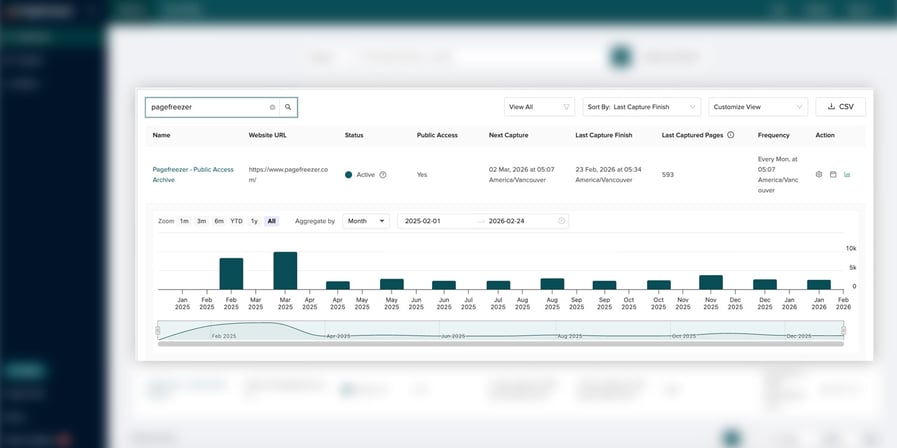
Fully Automated Website Archiving
With Pagefreezer Website Archiving, the archiving process is fully automated.You don’t have to manually capture your site’s content every time there’s a change.
The platform archives your site at regular intervals and automatically archives every update, including deletions, multimedia content, and dynamic elements.
Capture and Replay Full Dynamic Sites
Pagefreezer Website Archiving captures complex, dynamic pages in a way that preserves how they looked and functioned at the time of capture.
That includes:
- Interactive elements
- Navigation menus
- Embedded media
- Forms
- Responsive layouts
- And other content
The result is a fully navigable archive that lets you replay the site as it appeared at a specific point in time.
Prove Compliance
Pagefreezer Website Archiving ensures your website archive meets all compliance requirements, including defensible digital signatures and tamper-proof records. This means that your archived content can be used as legal evidence in court or for regulatory audits, with full confidence in its accuracy and authenticity.
Powerful Search Features
One of the most powerful features of Pagefreezer Archiving is its advanced search functionality. You can easily search through your entire website archive to find specific pages, keywords, or metadata.
This makes it simple to retrieve historical content, track changes over time, or locate specific information needed for legal or compliance purposes.
Easy Exports and Accessibility
Pagefreezer Archiving makes it easy to export archived content and metadata in various formats, like PDF or WARC. You can quickly share archived data with stakeholders, whether it’s for a legal case, compliance audit, or internal review.
The user-friendly dashboard allows teams to access and replay archived content without needing IT support.
Choosing a Website Archiving Solution
When choosing a web archiving solution, look for one that can:
- Crawls and capture your site automatically, without manual intervention
- Save timestamps and metadata
- Replay old page versions as if they were live
- Search by keyword, URL, or date
- Export records when needed
- Capture dynamic content
- Meet records retention requirements
Website Archiving FAQ
What is website archiving?
Website archiving is the process of saving records of your website as it appeared at specific points in time. A proper archive preserves pages, metadata, timestamps, and other details so the content can be searched and reviewed later.
Is a CMS backup the same as a website archive?
No. A CMS backup helps restore your website if something breaks, but it is not designed to preserve a searchable, replayable record of what appeared on your site. For legal or compliance needs, a website archive is more appropriate.
What is the best way to archive a website?
The best way to archive a website is to use an automated archiving solution. It should capture changes regularly, preserve metadata, let you replay old versions of pages, and export records when needed.
Can I archive a website for free?
Yes, you can use free tools like the Wayback Machine, HTTrack, or Conifer for basic captures. However, free tools often require manual work and don’t capture complex websites accurately enough for legal, compliance, or long-term recordkeeping needs.
Want to learn more? See how Pagefreezer is archiving 150,000 webpages to meet the needs of a leading global tech company’s legal and marketing teams.